Manage cookies that are used for advertising, such as ad personalization, remarketing, and ad effectiveness analysis.
4.9.10. Webhooks for mail
Attention!
For corporate mail only.Notes:
- Requests are sent with the User-Agent
adm.tools mail webhook. - If the request did not receive a 200 response, one resend is performed after 15 minutes (visible in the log of recent requests).
How it works
The principle of webhooks is as follows:
- You create a webhook, select the events that should trigger it, and specify the address where the request should be sent.
- At the specified address, place a script that will receive and process requests from the webhook (see script example).
- Next, when a selected event occurs in the mailbox (for example, a new message arrives), the server automatically sends a request to the script at the specified address.
- The script receives the request and performs actions according to the logic specified in it (for example, connects to the mailbox and downloads the entire message or sends a notification about a new message to the messenger).
What is transmitted in the request:
- For any events:
mailbox— mailbox address.uid— unique message identifier.tstamp— event timestamp.event— event type:new— new message in mailbox.create— new message in folder.flags-set— change flags or delete message.
folder— folder containing the message.flags— flag values (\\Seen,\\Deleted, etc.).
- For new message events:
from— sender's address.to— recipient's address.subject— subject of the message.snippet— preview of the body of the message (the full text can only be obtained directly by connecting to the mailbox).message_id— globally unique message identifier.
Create
- Open the "Webhooks" section.
- Click "Create webhook".
- Fill out the form and click "Create":
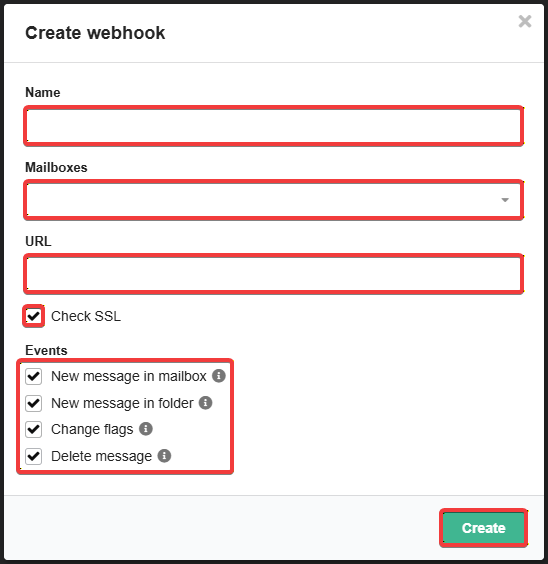
- Name — the name of the webhook.
- Mailboxes — which mailboxes should trigger the webhook.
- URL — where the request will be sent (address in the format
https://example.com/webhook.php). - Check SSL — if enabled, the request will only be sent if the site from the URL has a valid SSL certificate.
- Events — under what conditions will the webhook be triggered:
- New message in mailbox — when a new message arrives.
- New message in folder — when a message appears in any folder (moving, creating a draft, etc.).
- Only actions within the mailbox are considered. The arrival of a new message is not considered the appearance of a message in the folder.
- Change flags — when changing a set of flags (read, marked, etc.).
- Delete message — permanently deleting a message (moving it to the trash is not considered deletion).
- Confirm ownership of the site from the URL — place a file named
webhook-confirm.txtin the root directory of this site, which will contain your account ID.
Manage
All created webhooks are displayed in the list in the "Webhooks" section:
You can copy the secret token in the "Token" column. The token is sent in the X-Webhook-Token header when sending a request to the address from the URL. With its help, the script that processes the request can verify that the request was sent from our server.
The "Last request" column displays the response code, date, and time of the last request.
The "Log of recent requests" button opens a window with detailed information about the last 50 requests. The window displays information about each request: mailbox name, triggered event, response code, date and time of request submission, and retry (if any).
You can change the settings of an existing webhook using the ⚙️ ("Edit") button. The settings are the same as when creating one. Please note that if you change the site address in the URL, you will need to confirm that you own it.
Script example
An example of a simple script that receives a request from a webhook, processes it, and saves the received data as a JSON string to the data.log file:
<?php

// Specify your webhook token here to check the authenticity of requests from the server
define('SECTRET_TOKEN', 'your_webhook_secret_token_here');

header('Content-Type: application/json; charset=utf-8');

if ($_SERVER['REQUEST_METHOD'] !== 'POST') {
	http_response_code(405);
	echo json_encode(['ok' => false, 'error' => 'Method Not Allowed'], JSON_UNESCAPED_UNICODE);
	exit;
}

$headers = getallheaders();
if (!isset($headers['X-Webhook-Token']) || $headers['X-Webhook-Token'] !== SECTRET_TOKEN) {
	http_response_code(401);
	echo json_encode(['ok' => false, 'error' => 'Incorrect webhook token'], JSON_UNESCAPED_UNICODE);
	exit;
}

$raw = file_get_contents('php://input');
if ($raw === false || $raw === '') {
	http_response_code(400);
	echo json_encode(['ok' => false, 'error' => 'Empty body'], JSON_UNESCAPED_UNICODE);
	exit;
}

$data = json_decode($raw, true);
if (json_last_error() !== JSON_ERROR_NONE) {
	http_response_code(400);
	echo json_encode(['ok' => false, 'error' => 'Invalid JSON: ' . json_last_error_msg()], JSON_UNESCAPED_UNICODE);
	exit;
}

$entry = [
	'ts'   => gmdate('c'),
	'ip'   => $_SERVER['REMOTE_ADDR'] ?? null,
	'ua'   => $_SERVER['HTTP_USER_AGENT'] ?? null,
	'data' => $data,
	'webhook_id' => $headers['X-Webhook-Id'] ?? null,
];

// JSONL: one entry = one line
$line = json_encode($entry, JSON_UNESCAPED_UNICODE | JSON_UNESCAPED_SLASHES) . PHP_EOL;
$ok = file_put_contents(__DIR__ . '/data.log', $line, FILE_APPEND | LOCK_EX);

if ($ok === false) {
	http_response_code(500);
	echo json_encode(['ok' => false, 'error' => 'Failed to write log'], JSON_UNESCAPED_UNICODE);
	exit;
}

http_response_code(200);
echo json_encode(['ok' => true], JSON_UNESCAPED_UNICODE);
(2)