Manage cookies that are used for advertising, such as ad personalization, remarketing, and ad effectiveness analysis.
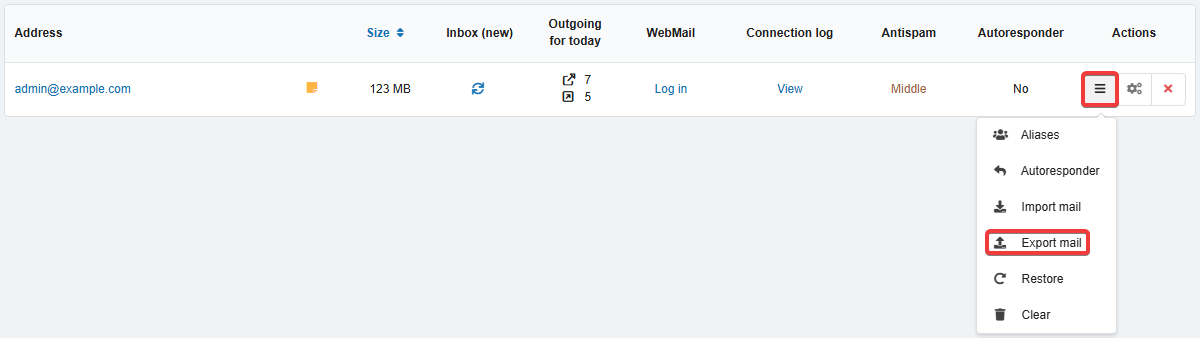
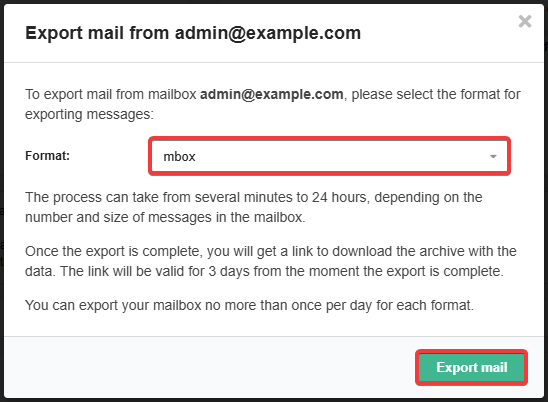
4.7.3. Mail export
Formats
mbox
Notes:
- Mail in mbox format can be imported back into your mailbox.
- To view the contents of mbox files, you can use the free open source program Simple MBox Viewer (Windows) or similar software.
When exporting in this format, the contents of each folder are saved as a text file, where messages are stored as text one after another (each message in the file begins with the text From and ends with a blank line). Messages from Gmail mailboxes are saved in the same format when exporting data using Google Takeout.
Maildir
When exporting in this format, the contents of each folder are saved as a separate directory with subdirectories tmp (in the process of delivery), new (unread), and cur (read), in which each message is stored in a separate file with a unique name. This format is supported by various mail servers, delivery agents, and some mail clients and mail management programs.
Procedure
Important points:
- You can submit a maximum of two export requests per mailbox — one for each of the formats.
- Each archive is stored for 3 days from the time the request is submitted, after which it is automatically deleted.
- You can submit a new export request only after the previous archive in the same format has been automatically deleted (early deletion is not available).
- Deleting a mailbox does not affect the archive storage period.

Alternative methods
You can export the contents of mailboxes manually using specialized apps, e.g. MailStore Home.
If the goal is to transfer messages from mailboxes hosted by us to mailboxes of another mail service, it is worth checking the documentation or support of that service for an automatic import feature similar to ours, or transfer the messages using specialized apps, e.g., the console app imapsync or its online version imapsync online.
You can also transfer messages using any mail client. An example of transferring messages between mailboxes using Thunderbird is described in the article Importing mail.
(1)