Manage cookies that are used for advertising, such as ad personalization, remarketing, and ad effectiveness analysis.
8.3.9. PostgreSQL users
Notes:
- Each instance always has the
hoster_controlsystem user, which is used to manage the service via the control panel (creating databases, users, etc.). - In the creation, binding, and privileges configuration forms, you can grant access to existing database tables.
Users are managed in the "PostgreSQL" section on the "Databases" tab — the list is expanded by the "Users" button: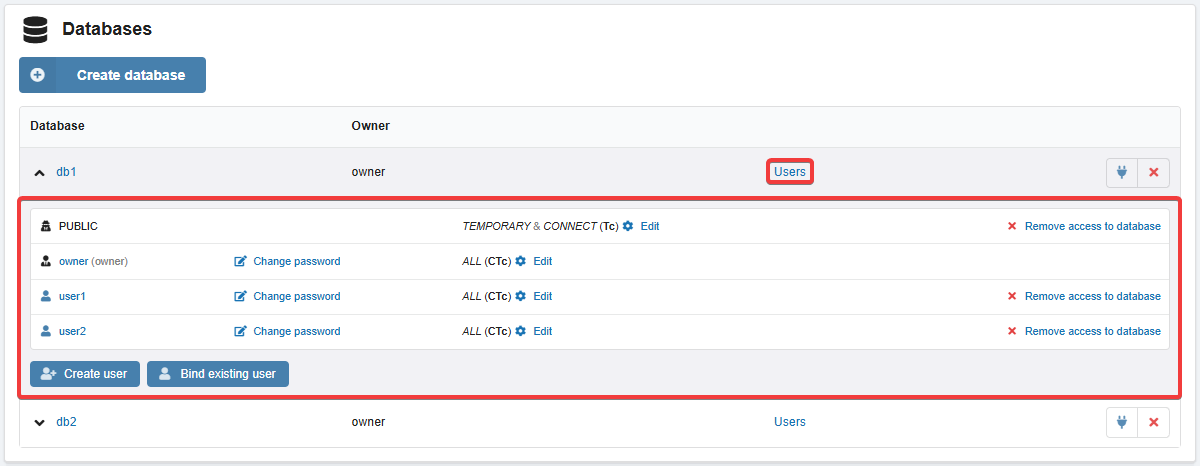
The list of all users and database binding information is displayed in the "PostgreSQL" section on the "Users" tab: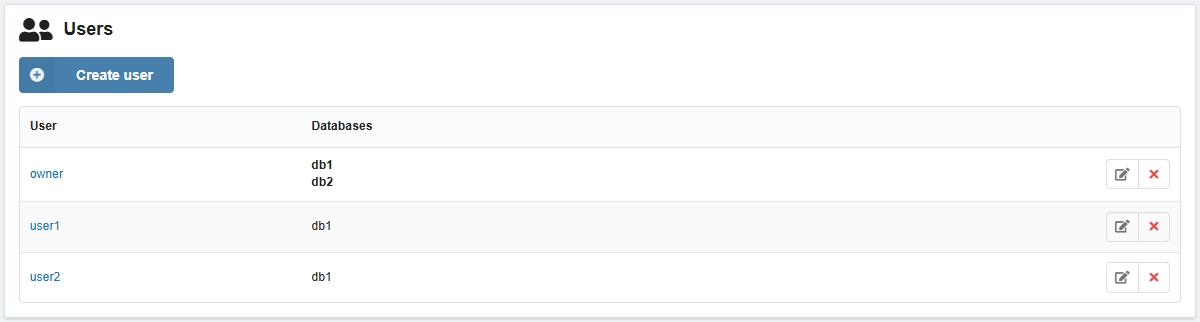
Create
When you create a database, you can immediately create a user with the same name for it.
- On the "Databases" tab in the user list, click "Create user".
- Specify login, password and click "Create".
Bind
- On the "Databases" tab in the user list, click "Bind existing user".
- Select a user from the list of existing users and click "Bind".
Change password
Attention!
User passwords are not stored publicly on the hosting. If you lose your password, you can only set a new one.- On the "Databases" tab, in the user row, click "Change password" or on the "Users" tab, in the user row, click 📝.
- Specify a new password and click "Change".
Configure privileges
- On the "Databases" tab, in the user row, click "Change".
Delete
Only users who are not associated with any of the databases (not binded or owned) can be deleted.
On the "Databases" tab in the user row, click "Delete access to database" or on the "Users" tab in the user row, click ❌ and confirm the operation.