Manage cookies that are used for advertising, such as ad personalization, remarketing, and ad effectiveness analysis.
4.6.3. Mailbox connection log
Important points:
- Information is logged not instantly, but within a few minutes.
- When working with a mailbox using WebMail classic, log entries with hosting IP addresses may be present.
- The log retention period depends on the type of mail domain: hosting account mail — 3 days, corporate mail — 3 months.
The connection log displays information about when connections to the mailbox were made, from which IP addresses, using which protocols, and whether they were successful.
To view the log, open the "Mail → your mail domain → Mailboxes" and in the mailbox menu, click "Connection log":
Date and filters
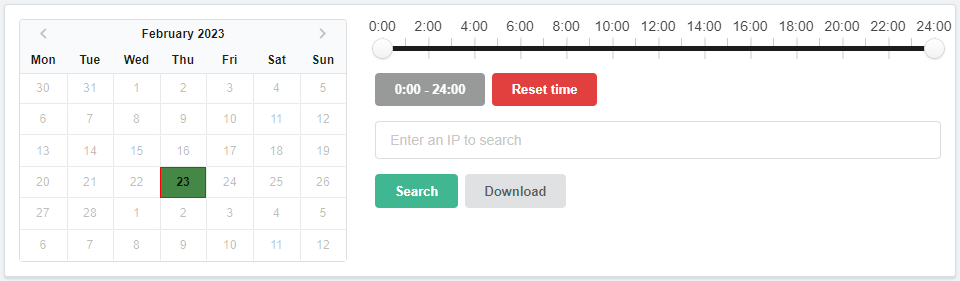
Calendar. Allows you to select the day for which the log will be displayed. In the calendar:
- Light green — days for which logs are available.
- Dark green — selected day.
- Red frame — current date.
Time filter. Allows you to view the log not for the whole day, but for a selected time period.
Search. Allows you to filter log entries by IP address.
The "Download" button downloads the log for the day selected in the calendar.
Log

- Time — date and time of the authorization attempt in the mailbox.
- IP — IP address from which the authorization attempt was made. Clicking on it puts it into the filter.
- Protocol — protocol used for connection (IMAP, POP3 or SMTP).
- Method — authentication method. Obsolete CRAM-MD5 and APOP methods are marked in red.
- SSL — shows whether a secure connection was used or not.
- Login — shows whether the authorization was successful or not.