Manage cookies that are used for advertising, such as ad personalization, remarketing, and ad effectiveness analysis.
4.6.4. Rejected emails log
Notes:
- Messages are logged within minutes of being rejected.
- The information in the log is available for the last 3 days.
- The log does not include records about messages that were not delivered due to unpaid mail service.
The rejected emails log contains information about messages that were sent to your mailboxes, but were rejected by our mail server for some reason (for example, because the sender was in the blacklist or exceeded space for mail). The log is located in the "Rejected emails" section.
Date and filters
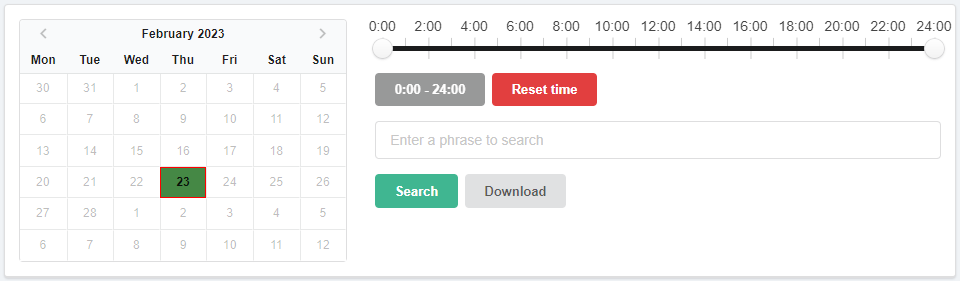
Calendar. Allows you to select the day for which the log will be displayed. In the calendar:
- Light green — days for which logs are available.
- Dark green — selected day.
- Red frame — current date.
Time filter. Allows you to view the log not for the whole day, but for a selected time period.
Search. Allows you to filter log entries by the presence of certain text in them.
The "Download" button downloads the log in JSON format for the date selected in the calendar.
Log
The download and deliver buttons are not available for messages that have been rejected due to exceeding space for mail.

- "Time" — the time when the message was received by our mail server.
- "Sender server" — name of the sender's server and its IP address. Clicking on it adds it to the whitelist.
- "Sender" — sender information.
- "Recipient" — the address of the mailbox to which the message was addressed.
- "Spam rating" — spam rating of the message.
- "Rejection reason" — reason for rejecting the message.
- "Download" — downloading message in eml format.
- "Deliver" — forced delivering the message to the mailbox.