Manage cookies that are used for advertising, such as ad personalization, remarketing, and ad effectiveness analysis.
4.6.5. Unsent emails log
Unsent messages are not resent automatically. For example, if messages were not sent because the sending limit was reached, you’ll need to resend them after the limit has been reset or increased.
In the unsent emails log, information is displayed about emails that were not sent for some reason (for example, the send limit was reached, an invalid sender or an invalid "From" header was used). The log allows you to determine who did not receive the emails, find the source of spam, and so on.
Depending on the sending method and the mail domain used, the log is available in different locations:
- In the "Undsent emails" section for hosting account (or "Hosting → Unsent emails").
- In the "Unsent emails" section for mail domain (or "Mail → your domain → Unsent emails").
Messages are stored in the log for 1 week.
Date and filters
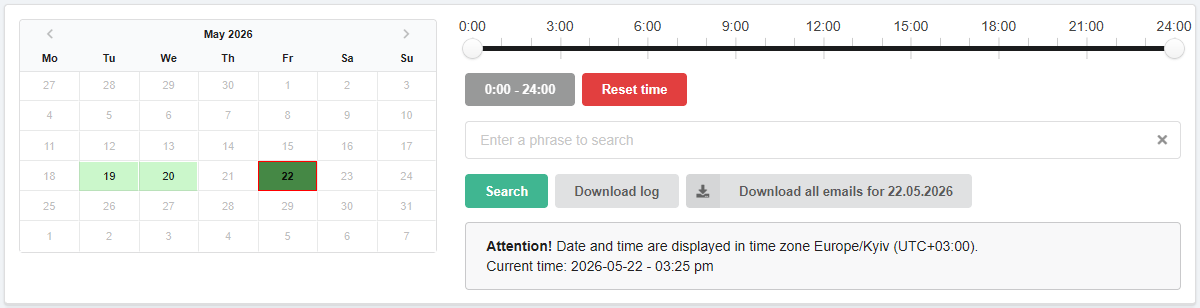
Calendar. Allows you to select the day for which the log will be displayed. In the calendar:
- Light green — days for which logs are available.
- Dark green — selected day.
- Red frame — current date.
Time filter. Allows you to view the log not for the whole day, but for a selected time period.
Search. Allows you to filter log entries by the presence of certain text in them.
Download. Download buttons:
- Download log — downloads the log in JSON format for the date selected in the calendar.
- Download all emails for day — downloads an archive containing all unsent emails in EML format for the selected day.
- The button appears only if there are emails available for download.
Log
Log of unsent emails for the hosting account:
- Time — the date and time the email was attempted to be sent.
- Sender server — the name and IP address of the sending server.
- Sender — the sender's address.
- Recipient — the recipient's address.
- Rejection reason — reason why the message was not sent.
- Download — downloading email in EML format.
Log of unsent emails for the mail domain:
- Time — the date and time the email was attempted to be sent.
- Sender — the sender's address.
- Recipient — the recipient's address.
- Rejection reason — reason why the message was not sent.
- Download — downloading email in EML format.