Manage cookies that are used for advertising, such as ad personalization, remarketing, and ad effectiveness analysis.
8.4.9. ClickHouse users
Important points:
- No password is provided for the default user.
- Only pre-made roles can be used; you cannot create your own.
Users are managed in the "ClickHouse" section on the "Databases" tab — the list is expanded using the "Users" button: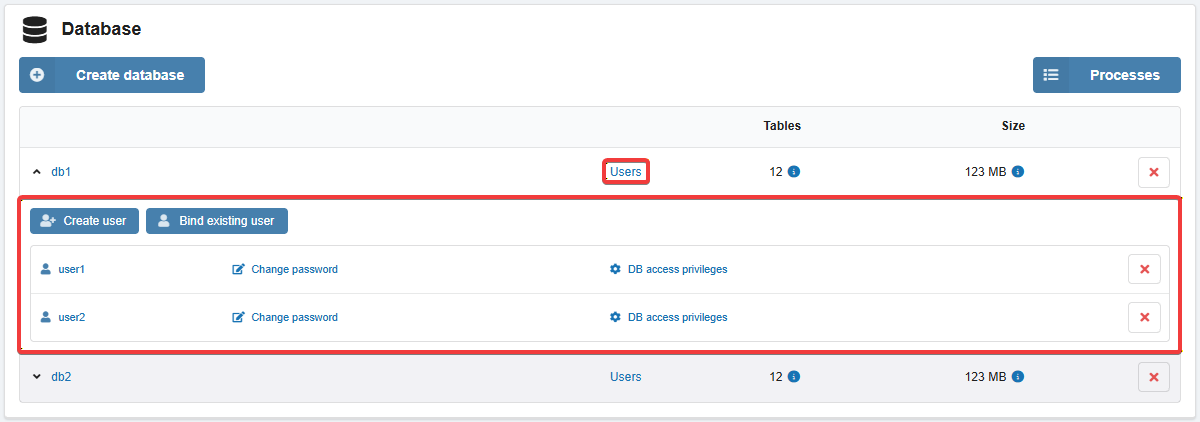
The list of all users and database binding information is displayed in the "ClickHouse" section on the "Users" tab: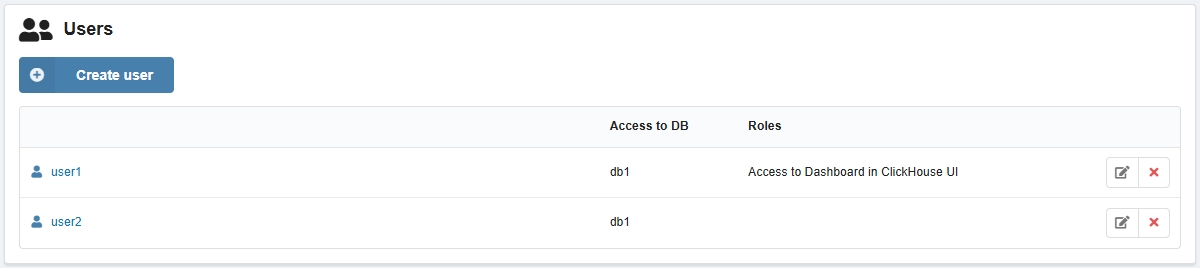
Create
When you create a database, you can immediately create a user with the same name and full privileges.
- On the "Databases" tab in the user list, click "Create user".
- Enter login and password, select privileges and roles, and click "Create".
Bind
- On the "Databases" tab in the user list, click "Bind existing user".
- Select one or more users, select privileges, and click "Bind".
Configure database privileges
- On the "Databases" tab, in the user row, click "DB access privileges".
- Select privileges and save changes.
Change password, configure server privileges and roles
Attention!
User passwords are not stored publicly on the hosting. If you lose your password, you can only set a new one.- Open user settings in either of two ways:
- On the "Databases" tab, click "Change password" in the user row.
- On the "Users" tab, click "Edit" in the user row.
- Enter a new password, select privileges and roles, and save your changes.
Delete
Deleting on the "Databases" tab only unbinds the user from the database without actually deleting them.
On the "Users" tab, in the user row, click ❌ and confirm the operation.