Manage cookies that are used for advertising, such as ad personalization, remarketing, and ad effectiveness analysis.
8.2.13. MySQL backups
Working with backups is performed in the "MySQL" section on the "Backups" tab: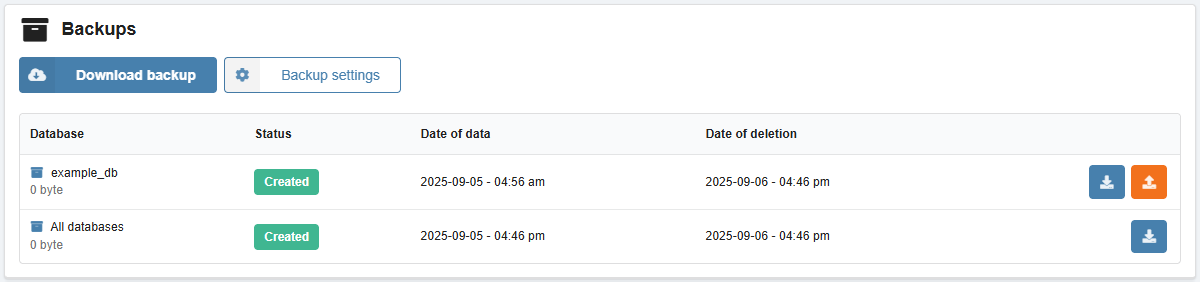
Automatic backups
Important points:
- Backups:
- Usually created at night.
- Do not use space in the instance (are stored on a separate server).
- Not created for empty instances without databases.
- A backup for the 1st day of the month is not created if automatic backups are disabled in settings.
Settings
- Click "Backup settings".
- Select the desired backup frequency and number of backups, then save your changes:
- Once a day — daily.
- Once a week — every Sunday.
- Once a month — on the 1st day of each month.
- Do not create automatic backups — completely disables the creation of automatic backups (including backups for the 1st day of the month).
Create
Important points:
- The storage period for created backups— 1 day. We recommend download them right after creation.
- Maximum number of backups at any given time — 5 (excluding a backup for the 1st day of the month).
- It is not possible to delete created backups before their expiration date.
- To create backups above the limit or download backups of individual databases for the current date, use the export using MySQL clients or console.
Backups can be created based on the current contents of the database or for a past date for which automatic backups are available.
- Click "Download backup".
- Select the database, the date of the backup (for all databases, only the current date can be selected), and click "Create a request for a copy."
As a result, an archive with a database dump in SQL format will be generated, which can be downloaded or restored (a backup copy of all databases can only be downloaded). The resulting dump can be imported in the usual way if necessary.
Restore
Databases can be restored from a backup. When restoring, the current contents are replaced with the data from the backup.
- Create a backup copy of the database to be restored (if not created).
- In the row with the backup, click the restore button and confirm the operation.
For each backup, a history of restore requests is displayed.