Manage cookies that are used for advertising, such as ad personalization, remarketing, and ad effectiveness analysis.
8.5.13. Redis backups
Automatic backups:
- Created every night.
- Stored for last 7 days and first day of the current month.
- Placed on a separate server and do not use space in the instance.
- Not created for empty instances with no user or service data.
Restoring backups and creating dumps is performed in the "Redis" section on the "Backups" tab: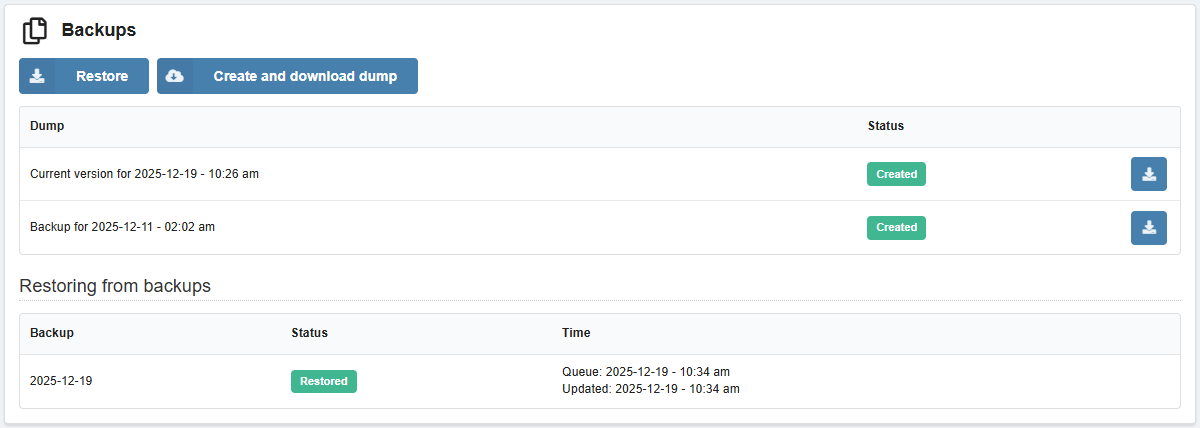
Restore
Instance can be restored from a backup. When restoring, the current content is replaced by the data from the backup.
- In the "Redis" section, on the "Backups" tab, click "Restore".
- Select the date and click "Restore".
On the backups page, a history of all restore requests is displayed.
Create and download dump
Attention!
Storage period for the created dump — 1 day.The contents of an instance or backup can be downloaded as a dump in RDB format.
- In the "Redis" section on the "Backups" tab, click "Create and download dump".
- Select the dump type (current version or backup), date (if selecting backup), and click "Create dump".
- Wait until the dump is created and download it using the appropriate button.
The resulting dump can be used for local deployment or transferring data to a third-party server.