Manage cookies that are used for advertising, such as ad personalization, remarketing, and ad effectiveness analysis.
8.5.11. Redis logs
Logs can be viewed in the "Redis" section on the "Log" tab: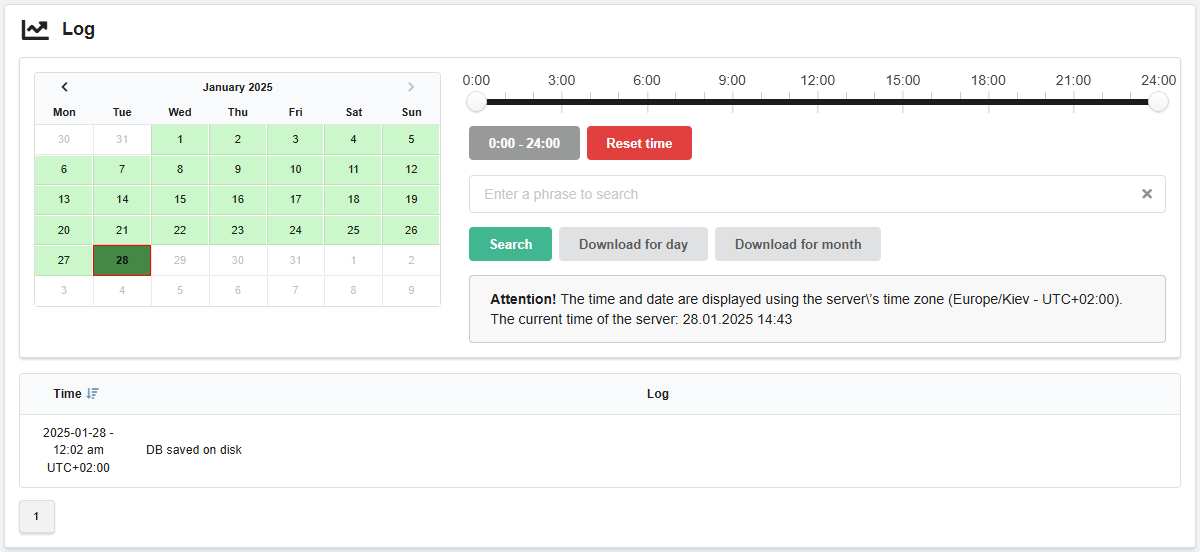
Date and filters
Important points:
- Logs are stored only for the last 1-2 months. Older logs are not stored.
- The current date in the calendar is always available, regardless of whether there are log entries or not.
Calendar. Allows you to select the day for which the log will be displayed. In the calendar:
- Light green — days for which logs are available.
- Dark green — selected day.
- Red frame — current date.
Time filter. Allows you to view the log not for the whole day, but for a selected time period.
Search. Allows you to filter queries by the presence of certain text in them.
Download. Download buttons:
- "Download for day" — downloads the log for the day selected in the calendar.
- "Download for month" — downloads the log for the month to which the selected day in the calendar belongs. ⚠️ The log for the current month includes all days from the beginning of the month, except the current one.
Log
In the log:
- "Time" — logging time.
- "Log" — record created by the Redis service during operation or when an error occurs.