Manage cookies that are used for advertising, such as ad personalization, remarketing, and ad effectiveness analysis.
8.5.9. Redis users
Notes:
- System user "Default" is for connecting to Redis by password only, without a login or with a login of a non-existent user. Suitable for use in older clients that only support password authorization.
- You can connect to Redis without a password, but without authorization the data will not be available.
Users are managed in the "Redis" section on the "Users" tab: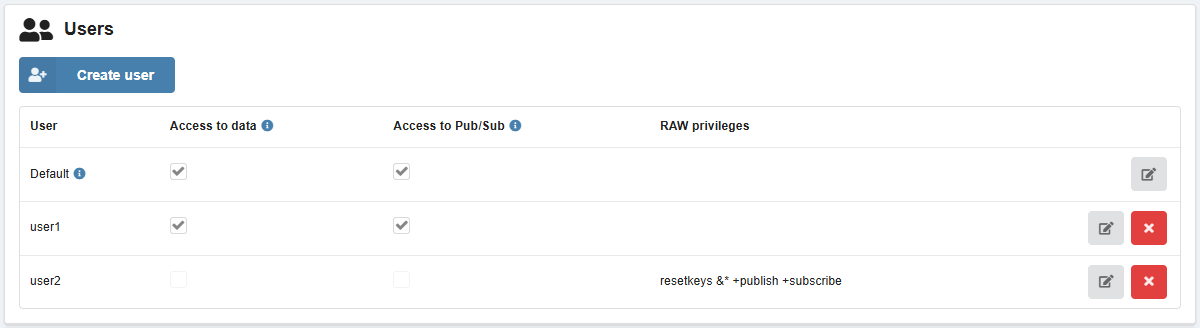
Create
- On the "Users" tab, click "Create user".
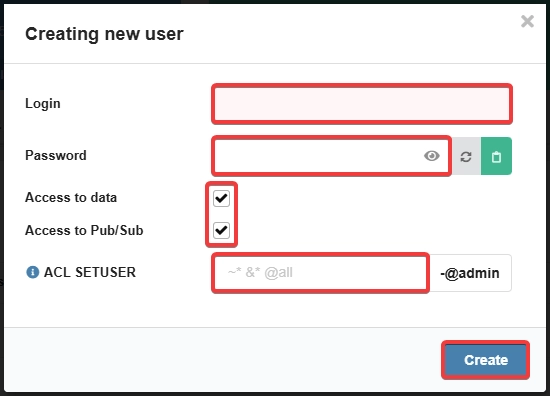
- Enter login and password, select privileges (see Configuring privileges) and click "Create":
Change password
Attention!
User passwords are not stored publicly on the hosting. If you lose your password, you can only set a new one.- On the "Users" tab, in the user row, click 📝.
- Specify a new password and click "Change".
Configure privileges
When own privileges are set, the options "Access to data" and "Access to Pub/Sub" do not apply.
- On the "Users" tab, in the user row, click 📝.
- Select the privileges and click "Change".
- "Access to data" — ability to read and write data by keys.
- "Access to Pub/Sub" — ability to use the Redis Pub/Sub event subscription system.
- "ACL SETUSER" — own privileges (see ACL SETUSER):
- Specified without
ACL SETUSERand username at the beginning, e.g.resetkeys &* +publish +subscribe. - In the list of users will be visible in the "RAW privileges" column.
Delete
The system user "Default" cannot be deleted.
On the "Users" tab, in the user row, click ❌ and confirm the operation.