Manage cookies that are used for advertising, such as ad personalization, remarketing, and ad effectiveness analysis.
4.4.9. Dedicated IP for mail
Important points:
- For corporate mail only.
- Mail domain with an active dedicated IP cannot be binded to a hosting account.
- When ownership is transferred, the dedicated IP is transferred along with the corporate mail.
About service
We actively fight against spam mailings and regularly monitor the purity of our addresses, but when using a shared IP, sometimes situations may arise when a mail server address is blacklisted due to intentional or unintentional actions of some users. Not all blacklists allow you to quickly remove a blacklisted address, and some only remove it after a certain period of time, which can have a negative impact on mail delivery.
Dedicated IP is an extra service that allows you to avoid such problems and send messages from a separate address, which is not affected by the actions of other users.
Order
Notes:
- For 1 mail domain, you can order only 1 dedicated IP.
- Addresses are assigned automatically and cannot be selected. Addresses that have already been ordered for this service are provided first (if they are available).
- Dedicated IP can only be used for the mail domain for which it was ordered.
- Open the "Mailboxes" section.
- In the "Settings" block, in the "Dedicated IP" row, click "Order":
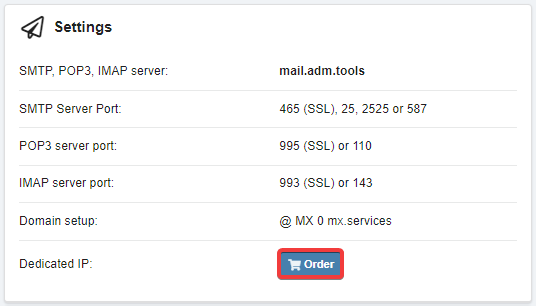
- Wait 30 minutes for the changes to take effect.
Payment
The service is payable per day from balance.
Configure
No action is required, the service works automatically.
Delete
Notes:
- Only active dedicated IP can be deleted.
- Without payment, the dedicated IP address will be automatically deleted after 10 days.
- Open the "Mailboxes" section.
- In the "Settings" block, in the "Dedicated IP" row, click 🗑.
- Wait 15 minutes for the changes to take effect.
(1)