Manage cookies that are used for advertising, such as ad personalization, remarketing, and ad effectiveness analysis.
4.4.5. Configure DKIM
Important points:
- DKIM only affects sending via SMTP with authorization and does not affect sending from a web server without authorization (e.g. using PHP mail function).
- For domains on our service, only the domain owner or a user with delegated access can enable DKIM.
- The mail domain must be active (paid).
- If, when creating a mail domain, the corresponding domain is available in the current account and served on our NS, DKIM will be enabled automatically.
Notes:
- It is recommended that you also configure a SPF record for the domain.
- Our DKIM signature selector is
hosting, so the DKIM record is added for thehosting._domainkeysubdomain. - When DKIM is enabled, its record is displayed in the "Domain settings (DNS)" section at the bottom of the DNS records list and cannot be edited.
DKIM (DomainKeys Identified Mail) is an email authentication method based on digital signature verification. The public key is stored in the TXT record of the domain. DKIM is required so that mail services can verify whether the sender is authentic or not. That is, it protects the recipient from various fraudulent messages sent with sender address spoofing.
- In the side menu, click "Configure DKIM".
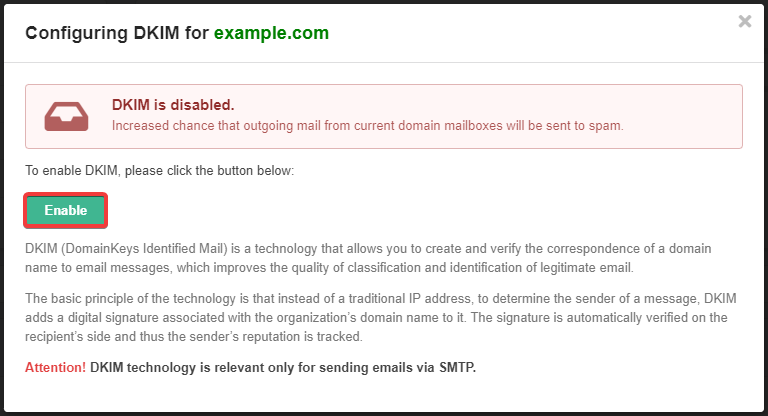
- Click "Enable":
- If the domain is served on third-party NS, go to the control panel of the owner of those NS and add the TXT record with that data:
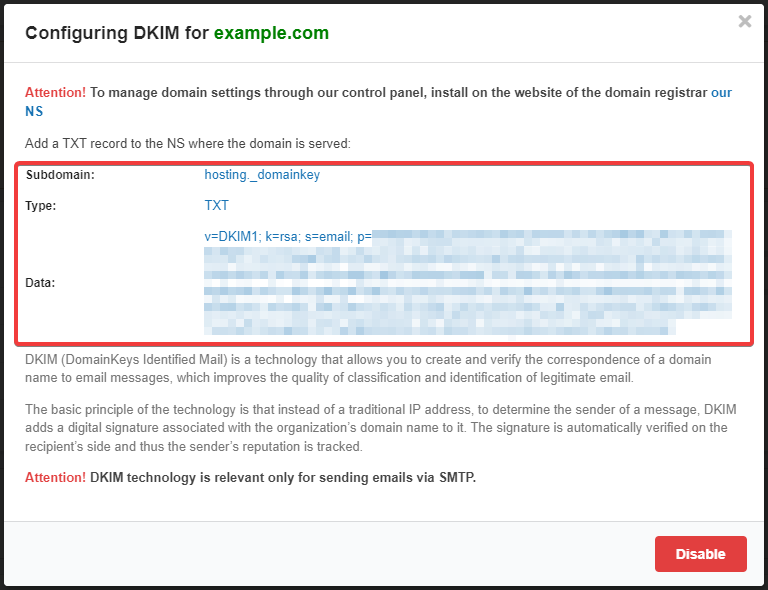
- Subdomain —
hosting._domainkey. - Record type — TXT.
- Data — text of the record from the DKIM configuration window (starting with
"v=DKIM1; k=rsa; s=email;and all the way through, including the symbol").
- Wait for the DNS cache to refresh (usually a few hours, maximum 24).
(7)
Comments