Manage cookies that are used for advertising, such as ad personalization, remarketing, and ad effectiveness analysis.
8.7.17. Dictionaries in Manticore Search
Dictionary types
Wordforms
The word form dictionary is used to normalize incoming words during indexing and searching. Essentially, this dictionary is used to replace some words with others (for example, the words "walks", "walked", and "walking" can be reduced to the normal form "walk"). The dictionary can also be used to implement exceptions to stemming, as it does not apply to words from the list of forms.
The dictionary file is a simple text file encoded in UTF-8. Each line of the file contains a pair of words — the source word form (what to replace) and the target word form (what to replace it with), separated by > or ⇒. The # symbol is used for comments.
Example of dictionary file content:
# comment
walks > walk
walked > walk
walking > walk
Exceptions
The exceptions dictionary (or synonyms) allows you to map one or more tokens to a single keyword (including tokens containing characters that are normally excluded). Exceptions, like word forms, perform matching but have several differences: they are case-sensitive, allow the use of special characters not included in the character set, and, at the same time, have lower performance when using a large dictionary.
The dictionary file is a simple text file encoded in UTF-8. Each line of the file contains a pair of words — the source word form (what to replace) and the target word form (what to replace it with), separated by > or ⇒. The # symbol is used for comments.
Example of dictionary file content:
# comment
MS Windows => ms windows
Microsoft Windows => ms windows
C++ => cplusplus
c++ => cplusplus
C plus plus => cplusplus
Stopwords
The stop word dictionary is used to ignore frequently repeated or insignificant words during indexing and searching. Stop words are not indexed, but they do affect the ranking of keywords (for example, if one document contains the phrase "in office" and another contains "in the office", then a search for "in office" as an exact phrase will return only the first document, even though "the" is omitted as a stop word in the second document).
The dictionary file is a simple text file encoded in UTF-8. The file contains a list of words, each word on a new line.
Example of dictionary file content:
a
the
is
of
for
Upload
Dictionaries can be uploaded in the "Manticore Search" section on the "Sources" tab. To upload a dictionary, click "Upload dictionary" in the "Dictionaries" block, in the form select dictionary type, specify its name, select the dictionary file, and click "Add".
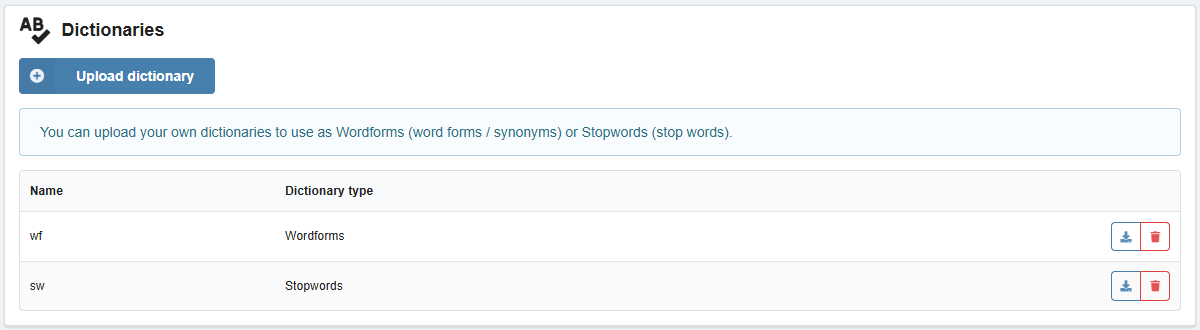
The uploaded dictionaries are displayed in the list. They can also be downloaded and deleted there.
Connect
Dictionaries are connected to tables on the "Tables" tab in the following ways:
- In the new table creation form — on the "Morphology" tab, select the "Glossaries of terms", "Thesaurus" and "Stopword lists" fields.
- In the form for editing the structure of an existing table — in the table block, click "Structure", on the "Morphology" tab, select the "Glossaries of terms", "Thesaurus" and "Syopword lists" fields.
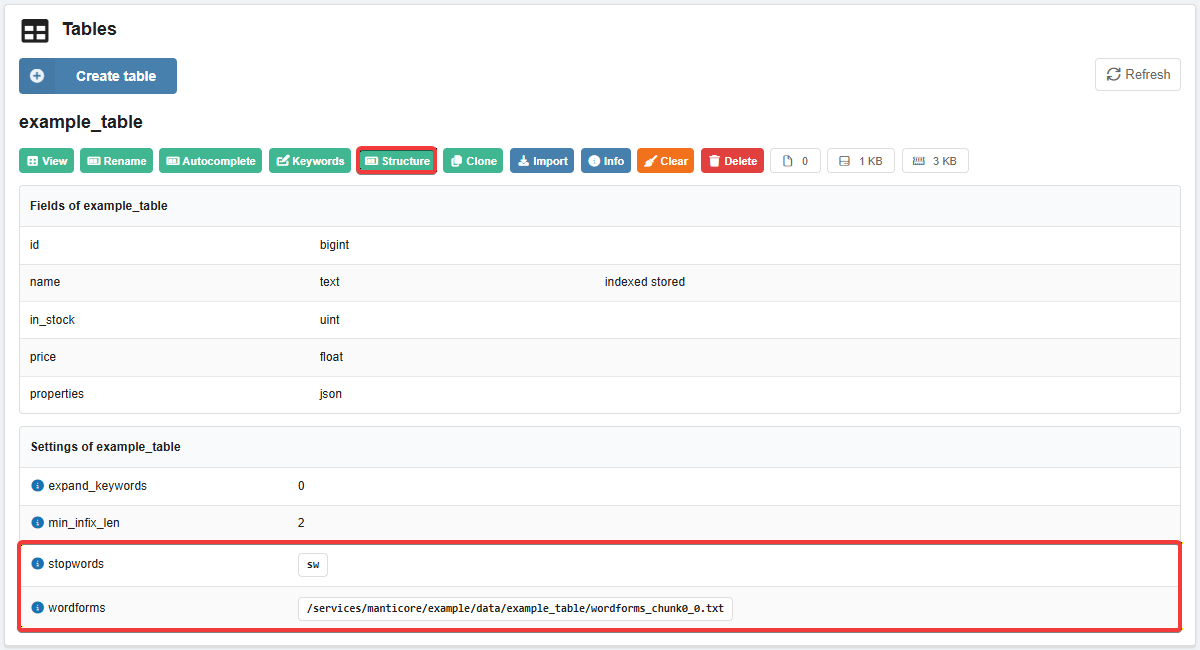
Connected dictionaries are displayed at the bottom of the table settings list. ⚠️ When creating a table, Manticore Search copies the dictionary to the instance in the data directory and changes its name, completely anonymizing it. Because of this, Manticore Search cannot determine which dictionaries are connected. To work around this, a comment is added to the beginning of each dictionary file with information about what kind of dictionary it is.
(1)