Manage cookies that are used for advertising, such as ad personalization, remarketing, and ad effectiveness analysis.
8.7.12. Manticore Search security
Notes:
- Maximum number of entries in the list — 32.
- Changes will take effect within 10 minutes.
Access restriction is configured in the "Manticore Search" section of the "Security" tab: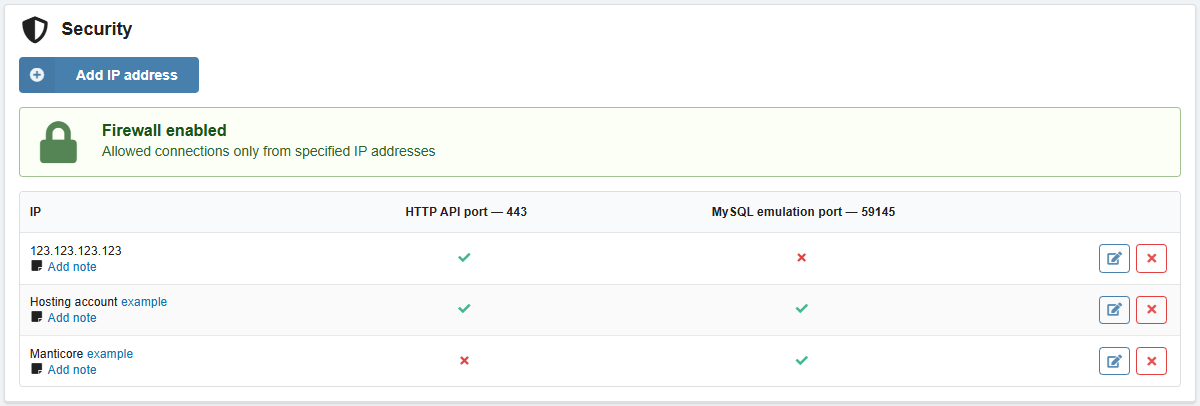
Using the "Add IP address" button, you can add IP addresses / hosting accounts / other Manticore Search instances and select the ports to which they should have access. The set of ports can be changed later.
If the site connecting to the instance is located on our hosting, then instead of an IP address, you should add the hosting account with this site to the security settings. This will ensure that the site has access to the instance during the migration of the hosting account between servers (for example, when changing the country, plan, or for technical reasons).
The access restriction mode depends on the selection of ports for entries in the list:
- The port is selected in the settings of one or more entries — the instance can only be connected to via this port from these IP addresses / hosting accounts / other Manticore Search instances; access is denied to all others.
- The port is not selected in the settings of any of the entries — the instance can be connected to via this port from any IP address.
For each entry in the list, you can add comments.