Manage cookies that are used for advertising, such as ad personalization, remarketing, and ad effectiveness analysis.
8.7.11. Manticore Search data sources
flowchart LR
hosting@{ shape: cyl, label: "☁️ Hosting account DB" }
other@{ shape: cyl, label: "🐬 Other DB" }
subgraph Data sources
source@{ shape: bow-rect, label: "🔗 Connected DB" }
end
table@{ shape: cyl, label: "🗄️ Tables
(RT mode)" } hosting-->|"Connect
(select from list)"|source other-->|"Connect
(connection credentials)"|source source-->|"Import
(manual, cron)"|table
(RT mode)" } hosting-->|"Connect
(select from list)"|source other-->|"Connect
(connection credentials)"|source source-->|"Import
(manual, cron)"|table
In the "Manticore Search" section on the "Sources" tab, you can connect databases that are used to import data into tables: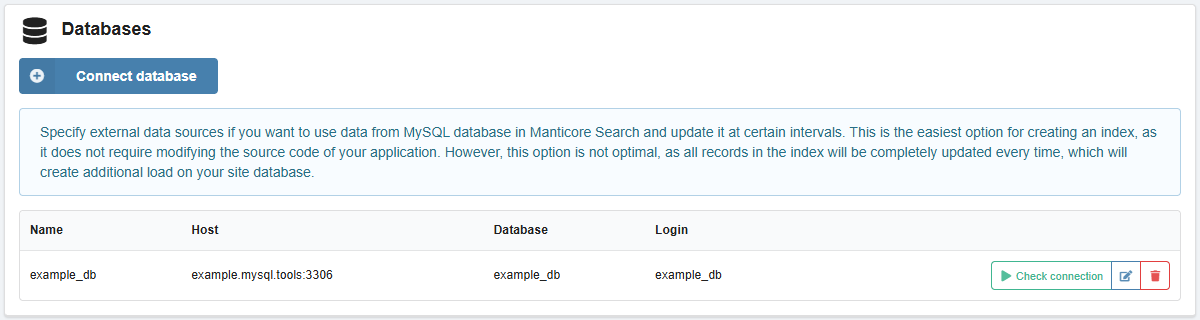
Connect
- Click "Connect database".
- Specify the connection name, database connection credentials (you can select an existing database from your hosting account or specify your own credentials) and save the changes:
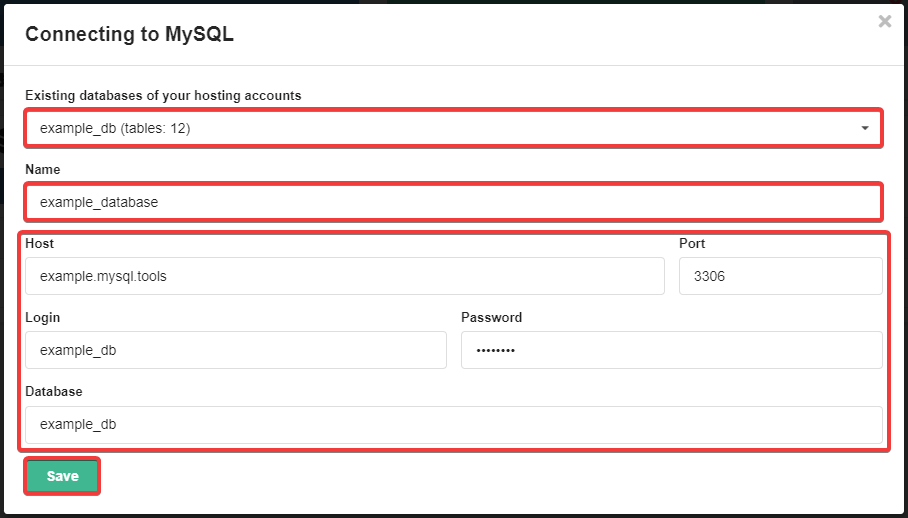
- Check the connection by clicking the "Check connection" button.
Change
To change the name and connection settings, use the 📝 ("Edit") button.
Delete
To delete the connection, click 🗑 ("Delete") and confirm the operation with the button in the window.