Manage cookies that are used for advertising, such as ad personalization, remarketing, and ad effectiveness analysis.
8.7.10. Manticore Search distributed indexes
flowchart LR
subgraph Other instance
table1@{ shape: cyl, label: "🗄️ Table
(node)" } end subgraph Other instance table2@{ shape: cyl, label: "🗄️ Table
(node)" } end subgraph Current instance table@{ shape: cyl, label: "🗄️ Table
(node)" } index@{ shape: rounded, label: "🗄️ Distributed index
(master node)" } end table1--->index table-->index table2--->index
(node)" } end subgraph Other instance table2@{ shape: cyl, label: "🗄️ Table
(node)" } end subgraph Current instance table@{ shape: cyl, label: "🗄️ Table
(node)" } index@{ shape: rounded, label: "🗄️ Distributed index
(master node)" } end table1--->index table-->index table2--->index
A distributed index allows you to search multiple tables at once and does not store any data itself. When a query is received, the distributed index ("master node") sends the same query to the connected tables ("nodes"), receives responses from them, and returns the combined results. You can connect to tables from both the current instance and other instances. This allows you to distribute large amounts of data across multiple tables and instances and work with them conveniently.
Distributed indexes are configured in the "Manticore Search" section on the "Sources" tab.
Create
Important points:
- When selecting tables from other instances in the security settings of those instances, a rule is automatically added that allows the current instance to access them via HTTP (this is necessary so that the distributed index can connect and retrieve data from the selected tables).
- Distributed indexes are created with the "distributed" type.
- In the "Distributed indexes" block, click "Create distributed index".
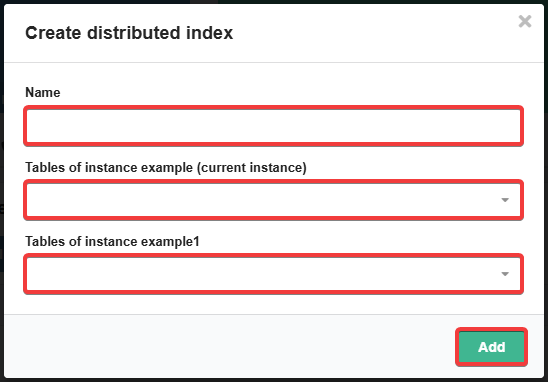
- Enter the name, select tables from available instances, and click "Add":
Manage

To change the set of connected tables, use the 📝 ("Edit") button.
To delete a distributed index, click 🗑 ("Delete") and confirm the operation with the button in the window.
Use
Working with distributed indexes is similar to working with tables (see Manticore Search tables)).