Manage cookies that are used for advertising, such as ad personalization, remarketing, and ad effectiveness analysis.
4.3.2.10. Delete emails in WebMail classic
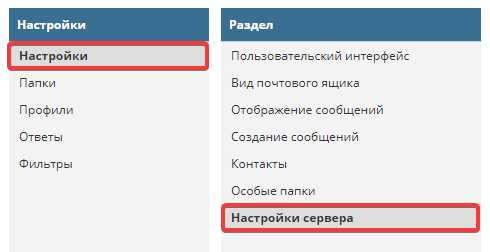
In WebMail classic, emails are deleted by moving them to the trash. You can find the settings in the "Settings → Settings → Server Settings" section:
Attention!
Emails in trash or marked for deletion also occupy disk space until they are permanently deleted.Configure working with emails
Server settings are divided into "Basic settings" and "Maintenance":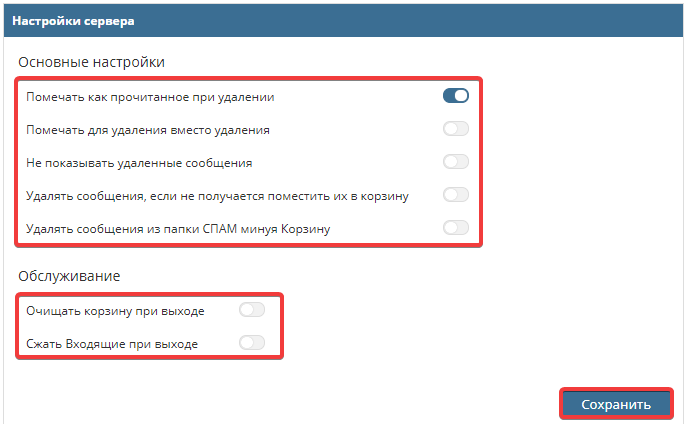
- "Main settings":
- "Mark as read on delete" — when deleting, email will be marked as read.
- "Mark for deletion instead of deleting" — deprecated email deletion method. Emails will still be located in the folder where they were marked for deletion, but they will be completely deleted only when compressing this folder or clearing it. Warning! Not recommended parameter.
- "Do not show deleted messages" — parameter controls hiding emails that were marked for deletion.
- "Delete messages if they cannot be moved to trash" — if it is impossible to move messages to trash, they will be deleted, bypassing trash.
- "Delete messages from SPAM folder bypassing Trash" — emails deleted in "SPAM" folder will be deleted bypassing trash. This parameter is convenient for situations when there are no necessary or important emails in spam and moving them to trash is not rational.
- "Maintenance":
- "Empty trash on logout" — when logging out from WebMail, messages located in trash will be deleted.
- "Compress Inbox on exit" — when exiting WebMail, messages located in "Inbox" folder will be compressed, and messages that were marked for deletion will be deleted.
Clear trash folder
To clear the trash, go to "Mail" section and then to "Trash" folder:
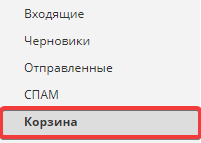 In the "Trash" folder, click the gear icon at the bottom of the page and the "Empty" button:
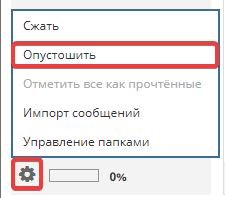 After these actions, the trash folder will be completely cleared.