Manage cookies that are used for advertising, such as ad personalization, remarketing, and ad effectiveness analysis.
4.5.2. Email sending limits per day
General information
Important points:
- When any of the limits is reached, all mailboxes in the mail domain stop sending mail in the direction that was limited by that limit.
- For a hosting account mail on test period that has never been paid for yet, the limits are equal to 100.
- When malware is detected in the hosting account:
- Sending messages from the web server without authorization is blocked.
- The limit on sending via SMTP with authorization for hosting account mail is lowered to 50 messages per day.
Information about limits is displayed in the "Mailboxes" section in the "Email sending limits per day" block: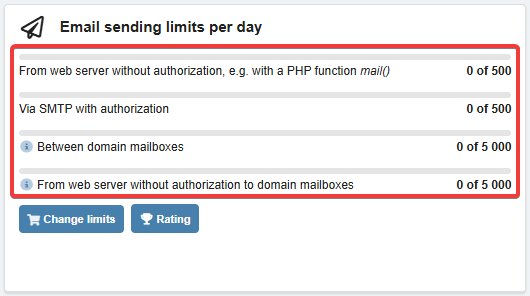
Limits
flowchart LR
subgraph d [Mail domain]
m1[Mailbox 1]
m2[Mailbox 2]
end
subgraph do [Other mail domains]
m[Mailboxes]
end
m1<-->|"5000 or plan limit
(5000-15000)"|m2 d-->|"Plan limit
(500-15000)"|do
(5000-15000)"|m2 d-->|"Plan limit
(500-15000)"|do
There are two separate limits:
- Sending within one mail domain — 5000 messages, or corresponds to the plan of this mail domain (if the plan's limit is more than 5000).
- Send to other mail domains — depends on the sender's mail domain type:
- Corporate mail — corresponds to the plan of this mail domain.
- Hosting account mail (total for all hosting account mail domains) — 500 from the web server without authorization and 500 via SMTP with authorization, or corresponds to increased outgoing mail limits (if ordered).
These limits are not related and are counted independently of each other. Sending within a domain does not increase the number of messages sent to other mail domains, and vice versa — sending to other domains does not increase the number of messages sent within the same mail domain.
Count limits
flowchart LR
script_mail@{ shape: stadium, label: "📜 Script
(PHP mail / sendmail)" } wm_filter@{ shape: stadium, label: "🔀 WebMail filter
(forwarding)" } script_smtp@{ shape: stadium, label: "📜 Script (SMTP)" } webmail@{ shape: stadium, label: "📧 WebMail.Online /
WebMail classic" } other@{ shape: stadium, label: "✉️ Other
mail clients" } site@{ shape: diamond, label: "🌐 Sending
from site?" } outgoing@{ shape: diamond, label: "⚙️ Outgoing mail selected for site?" } domain1@{ shape: diamond, label: "🌎 All recipients
within domain?" } domain2@{ shape: diamond, label: "🌎 All recipients
within domain?" } subgraph "Mail domain limits" web1@{ shape: stadium, label: "📤 From web server
without authorization" } web_d@{ shape: stadium, label: "📤 From web server
without authorization
to domain mailboxes" } smtp1@{ shape: stadium, label: "🔑 Via SMTP
with authorization" } smtp_d@{ shape: stadium, label: "🔑 Between domain mailboxes" } end subgraph "Hosting account limits" web2@{ shape: stadium, label: "📤 From web server
without authorization" } smtp2@{ shape: stadium, label: "🔑 Via SMTP
with authorization" } end script_mail-->site site-->|❌|web1 site-->|✅|outgoing outgoing-->|❌|web1 outgoing-->|✅|domain1 domain1-->|❌|web1 domain1-->|✅|web_d wm_filter---->domain1 script_smtp---->domain2 domain2-->|❌|smtp1 domain2-->|✅|smtp_d webmail---->domain2 other---->domain2 web1-.->|Only for hosting account mail|web2 smtp1-.->|Only for hosting account mail|smtp2
(PHP mail / sendmail)" } wm_filter@{ shape: stadium, label: "🔀 WebMail filter
(forwarding)" } script_smtp@{ shape: stadium, label: "📜 Script (SMTP)" } webmail@{ shape: stadium, label: "📧 WebMail.Online /
WebMail classic" } other@{ shape: stadium, label: "✉️ Other
mail clients" } site@{ shape: diamond, label: "🌐 Sending
from site?" } outgoing@{ shape: diamond, label: "⚙️ Outgoing mail selected for site?" } domain1@{ shape: diamond, label: "🌎 All recipients
within domain?" } domain2@{ shape: diamond, label: "🌎 All recipients
within domain?" } subgraph "Mail domain limits" web1@{ shape: stadium, label: "📤 From web server
without authorization" } web_d@{ shape: stadium, label: "📤 From web server
without authorization
to domain mailboxes" } smtp1@{ shape: stadium, label: "🔑 Via SMTP
with authorization" } smtp_d@{ shape: stadium, label: "🔑 Between domain mailboxes" } end subgraph "Hosting account limits" web2@{ shape: stadium, label: "📤 From web server
without authorization" } smtp2@{ shape: stadium, label: "🔑 Via SMTP
with authorization" } end script_mail-->site site-->|❌|web1 site-->|✅|outgoing outgoing-->|❌|web1 outgoing-->|✅|domain1 domain1-->|❌|web1 domain1-->|✅|web_d wm_filter---->domain1 script_smtp---->domain2 domain2-->|❌|smtp1 domain2-->|✅|smtp_d webmail---->domain2 other---->domain2 web1-.->|Only for hosting account mail|web2 smtp1-.->|Only for hosting account mail|smtp2
From web server without authorization — increases in the following situations:
- Sending messages using site scripts with the mail function or using sendmail:
- When outgoing mail is not selected for the site.
- When a mailbox is selected as the outgoing mail for the site and sending is performed to mailboxes of other mail domains (for example, from
aaa@domain1.comtobbb@domain2.com). - When sending is performed not from the site (for example, via console).
- Forwarding messages using WebMail.Online or WebMail classic filters to other domains (for example, a message received by
aaa@domain1.comis forwarded tobbb@domain2.com).
Via SMTP with authorization — increases when sending messages via SMTP to mailboxes of other mail domains (for example, from aa@domain1.com to bbb@domain2.com):
- By site scripts (SMTP).
- Via WebMail.Online or WebMail classic.
- Via other mail clients.
Between domain mailboxes — increases when sending messages via SMTP when all recipients have the same mail domain (for example, from aaa@example.com to bbb@example.com):
- By site scripts (SMTP).
- Via WebMail.Online or WebMail classic.
- Via other mail clients.
From web server without authorization to domain mailboxes — increases in the following situations:
- Sending messages with site scripts using the mail function or using sendmail, when a mailbox is selected as the outgoing mail for the site and all recipients have the same mail domain (for example, from
aaa@example.comtobbb@example.com). - Forwarding messages using WebMail. Online or WebMail classic filters when all recipients have the same email domain (for example, a message received by
aaa@example.comis forwarded tobbb@example.com).
Change limits
Instead of changing limits, you can:
flowchart LR
d[Corporate mail]
h["Hosting account mail
(500)"] d-->dpc[Changing the plan] dpc-->df["Corporate mail
(2000–15000)"] h-->s[Switching
to corporate mail] s-->df h-->oe[Ordering
increased limits] oe-->e["Increased limits
(2000–15000)"]
(500)"] d-->dpc[Changing the plan] dpc-->df["Corporate mail
(2000–15000)"] h-->s[Switching
to corporate mail] s-->df h-->oe[Ordering
increased limits] oe-->e["Increased limits
(2000–15000)"]
Corporate mail — you can only change the limits by changing the plan rate of the mail domain.
Hosting account mail — two methods are available:
- Ordering increased limits.
- Switching to corporate mail.
Limit for mailbox
Notes:
- The mailbox limit does not allow you to send more mail than the total limit allows.
- If the mailbox limit is reached, the error "5.7.1 Sender mailbox daily limit exceeded" will occur when sending new messages from the mailbox.
The limit is set in mailbox settings in the "Outgoing limit" field:
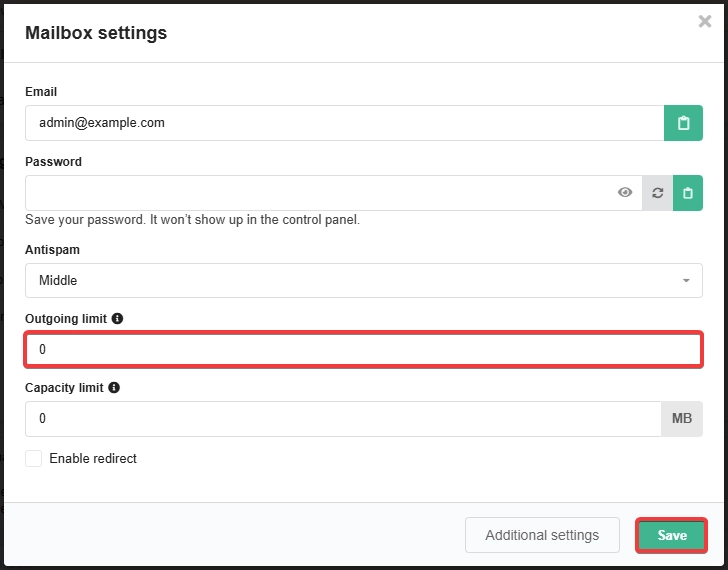
0— no limit (messages from the mailbox will be sent until the [[#Limits|total limit] is reached]).- Any value greater than
0— limits the number of messages that can be sent from this mailbox per day.
(2)