Manage cookies that are used for advertising, such as ad personalization, remarketing, and ad effectiveness analysis.
2.8.4.2.5. The Artisan utility
The Artisan utility is a command-line interface for working with the Laravel framework; it comes bundled with the framework and is installed when creating a project. This utility simplifies working with the framework and offers a wide range of features.
Using Artisan
The utility and its commands are run directly from the framework's project directory. To use them, follow these steps:
- Navigate to the project directory by running the following command:
cd ~/example.com/www/Replace
example.com/wwwwith the site root directory. - By default, the SSH environment on the hosting platform uses PHP 5.6. According to the framework requirements, you need version 7.3 or higher, so override the paths in the
$PATHvariable by running the following command:export PATH=/usr/local/php73/bin:/usr/local/bin:/usr/bin:/usr/local/sbin:/usr/sbin - Run the following command to check if Artisan is working:
php artisan- The
artisancommand can only be run from its directory. If you need to create a command that can be called without having to change directories, run the following command:echo "alias command='/usr/local/php73/bin/php ~/example.com/www/artisan'" >> ~/.bashrc && source ~/.bashrcModify the command as needed:
- Instead of "command", enter the desired name of the command you want to use. For example, you can enter a project name such as "laravel_example".
- Instead of "example.com/www", specify the site root directory.
- Check that the command is working by running:
command -VThe standard output of this command will be the version of the installed framework.
Artisan commands
If a global command has been created for Artisan, use it instead of
artisan.To display a list of available commands, run the following command:
php artisan list
You can view help information for all commands. To do so, use the help command followed by the name of the command you want information about:
php artisan help list
If you enter a command incorrectly, similar options will be suggested, for example: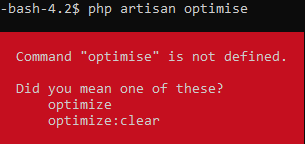
You can learn more about how Artisan commands work in the laravel.su documentation1) or in the official documentation.
| Command | Description |
|---|---|
| Main commands | |
clear-compiled | Delete compiled class files |
down | Enable maintenance mode / demo mode |
env | Display the current framework environment settings |
help | Display help for a command |
inspire | Display an inspiring quote |
list | Get a list of available commands |
migrate | Start database migration |
optimize | Optimize included files by creating cache files |
serve | Start the server (this command will not work properly on shared hosting) |
test | Run the app tests |
tinker | Interaction with the app |
up | Disable maintenance mode / demo mode |
1)
unofficial Russian-language documentation