Manage cookies that are used for advertising, such as ad personalization, remarketing, and ad effectiveness analysis.
6.14. Firewall for incoming traffic on Dedicated
Important points:
- A maximum of 10 rules can be added for a single server.
- When adding a rule, the correctness of the IP address, mask, and port is checked.
- Ports in the ICMP rules are automatically cleared when saved.
- Any changes will take effect within 5 minutes.
The firewall is configured in the "Dedicated" section on the "Firewall" tab: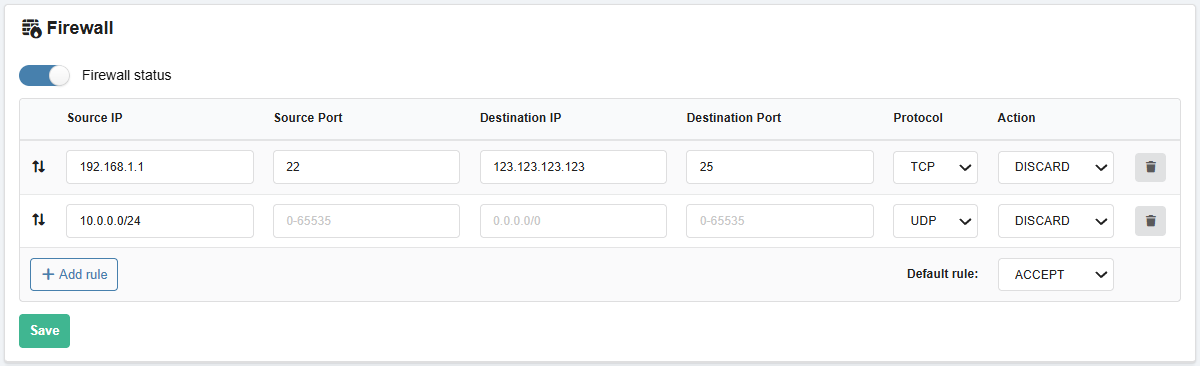
Firewall rules are applied on the switch to which the server is connected for incoming traffic going to that server. This allows malicious traffic to be blocked before it reaches the server.
Each rule contains fields:
- Source IP — from where the traffic is coming (you can specify an IP address, a subnet in CIDR format, or leave it blank).
- An empty value means all IPv4 and IPv6 addresses.
- To apply the rule only to IPv6 addresses, specify
::/0.
- Source Port — the port from which the traffic is coming (you can specify a single port, a range of ports, or leave it blank).
- Destination IP — where the traffic is coming from (usually the server's IP address).
- Destination Port — the port to which the traffic is coming (you can specify the port number, range, or leave it blank).
- Protocol — any (*), TCP, UDP, or ICMP.
- Action — ACCEPT (allow) or DISCARD (deny).
When the Firewall is enabled, the rules from the list are first applied in the order in which they are displayed (the order can be changed by dragging and dropping), then the rule from the "Default rule" field is applied.