Manage cookies that are used for advertising, such as ad personalization, remarketing, and ad effectiveness analysis.
6.8. Install OS and software on Dedicated
Attention!
When reinstalling the OS, all data on the server is deleted and the root user password is changed.Automatic install
Important points:
- A clean operating system is required to install the software, so it can only be installed by reinstalling the OS.
- In the OS list, parentheses indicate the installation mode: iPXE (recommended for modern platforms) or PXE (used for older platforms if iPXE does not work).
- List of software available for installation depends on the selected OS.
The automatic installation allows you to reinstall the operating system and install software completely automatically, without the need to execute console commands.
Supported software
- Control panels:
- Other:
Submit request
- Open the "Dedicated" section and switch to the "OS and software installation" tab.
- Click "Automatic install".
- Select the operating system and the necessary software (if required), configure the keys, and click "Install":
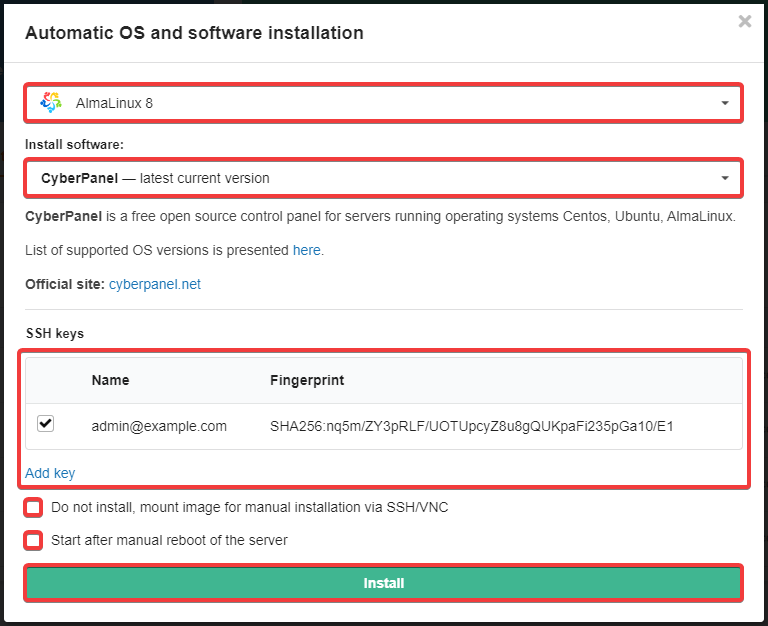
About SSH keys:
- SSH key authentication allows you to connect to the server via SSH or SFTP without entering a password.
- To generate and add a key to your account, use the instructions.
- The selected key will be added to the server after the OS is installed.
- Confirm the operation by clicking the button in the warning window.
- Wait for the operation to complete. The installation process usually takes no more than 15 minutes.
Data for access to OS and software
After reinstalling the OS, access data is sent to the account's email (only to the email, not sent to Telegram). The data includes the root user password for SSH access to the server.
After installing the software, the access data for it is:
- Sent to account email and Telegram.
- Displayed in a separate block on the tab.
- Available by clicking the ℹ️ button in the operation history.