Manage cookies that are used for advertising, such as ad personalization, remarketing, and ad effectiveness analysis.
2.14.12.1. Install DokuWiki
Automatic install
See CMS auto-install.
Manual install
Prepare
- Download the archive with the distribution of the latest version of DokuWiki to your PC from the official site.
- Place the distribution files on the hosting:
- Using file-manager or any FTP client, upload the archive to the root directory of the previously added site.
- Extract the downloaded archive using file manager.
- Move all contents of the subdirectory
dokuwikito the root directory of the site.
Install
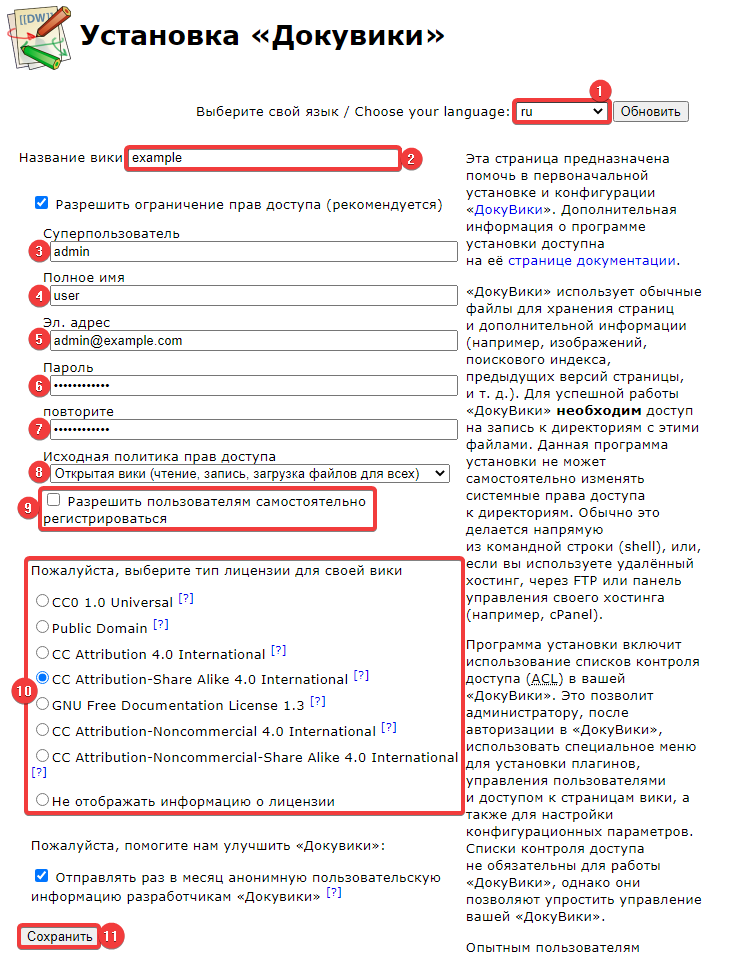
Open the file install.php in your browser by navigating to the link http://example.com/install.php, and fill in all the fields for further installation:
- "Select your language" — the language for installation and further configuration of DokuWiki.
- "Wiki title" — the title that will be displayed in the tab titles and on the pages.
- "Superuser" — administrator login.
- "Full name" — the name of the administrator.
- "Email address" — the email for sending official notifications.
- "Password" and "repeat" — administrator password.
- "Initial access policy" — a set of access rules for the ACL module:
- "Open wiki" — any user can modify/create/delete articles without prior registration or authorization.
- "Public wiki" — any user can edit/create/delete articles only after logging into their account, while any unregistered user can read articles.
- "Closed wiki" — the DokuWiki site will be accessible only after registration and authorization.
- "Allow users to register themselves" — enable this option if you want to allow users to register on their own.
- "Please select the type of license for your wiki" — the type of license for using DokuWiki.
- Click "Save" and check the operation of the site.