Manage cookies that are used for advertising, such as ad personalization, remarketing, and ad effectiveness analysis.
4.2.7. Configure autoresponder
Attention!
The autoresponder sends a reply to each address no more than once every 30 minutes. This is necessary to prevent potential looping in situations where the sender also has an autoresponder enabled.Notes:
- The auto-reply text editor supports basic HTML markup and has a visual editor.
- The subject of the autoresponder message contains the subject of the original message in the format "Autoresponder subject Re: Original message subject".
- An alternative autoresponder can be organized using filters in WebMail.Online or WebMail classic.
Autoresponder allows you to automatically send a reply with pre-prepared information in response to each incoming message.
To configure the autoresponder, open the "Mailboxes" section, and in the mailbox menu, click "Autoresponder":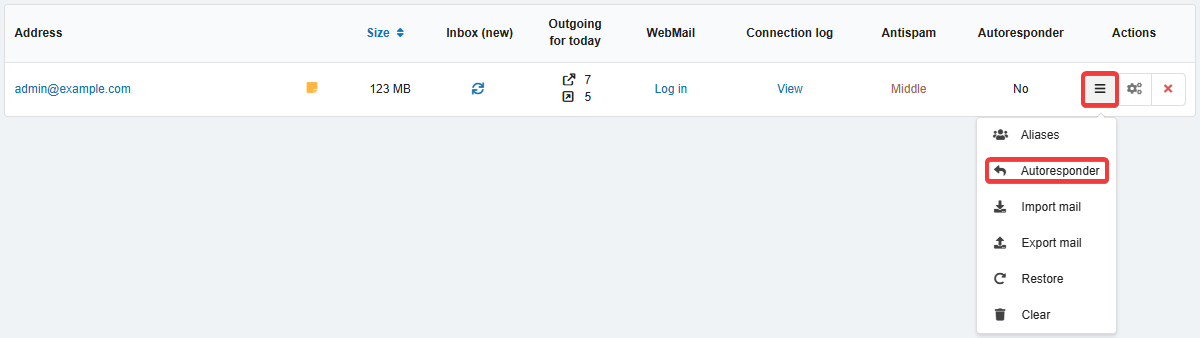
In the settings form, select the auto-reply mode, specify the subject and text of the reply message, and save your changes: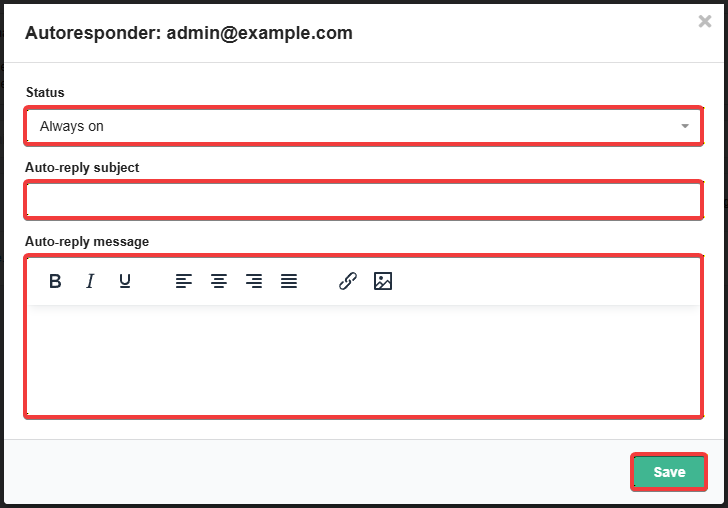
- Off — the autoresponder is turned off.
- Always on — the autoresponder is always on.
- Selected period (for corporate mail) — the autoresponder will be active during the specified period, after which it will automatically turn off.
- Additionally, you will need to select the start and end dates and times, as well as the time zone.
- Selected days of week (for corporate mail) — the autoresponder will be active on the selected days during the specified times; it will be turned off at all other times.
- Additionally, you will need to select the days of the week, start and end times, and the time zone.
When the autoresponder is enabled, the selected mode is displayed in green in the "Autoresponder" column of the mailbox list.
Comments