Manage cookies that are used for advertising, such as ad personalization, remarketing, and ad effectiveness analysis.
4.2.12. Restore messages in mailbox
For corporate mail only
Restoring messages in the mailbox is only available for corporate mail.When restoring messages in mailbox:
- Existing messages are not affected.
- Messages that have been moved or deleted since the backup was created are restored:
- If the message was moved, a duplicate will appear in the mailbox in the folder where the message was located when the backup was created.
- If the message was deleted, it will appear in the mailbox in the folder where it was located at the time the backup was created.
- Messages from the backup that are in the mailbox in the same folder are ignored during restoring.
- Deleted folders are restored with all their contents.
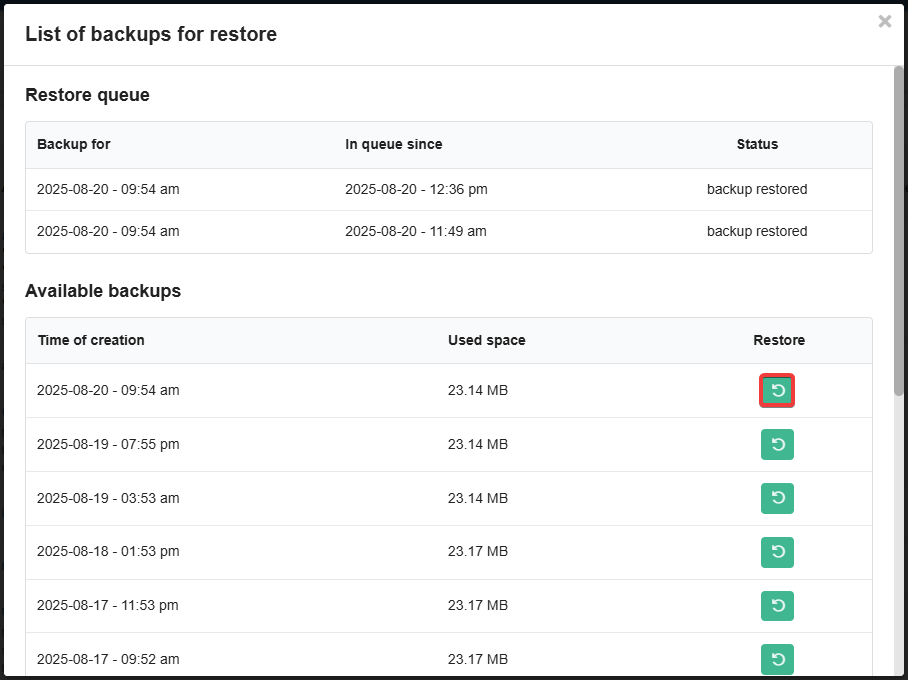
For each mailbox, backups are automatically created, from which you can restore deleted messages. Backups are stored for the last 10 days, with 1 or more backups per day. A list of all available backups is displayed in the restore form.
- Open the "Mailboxes" section.
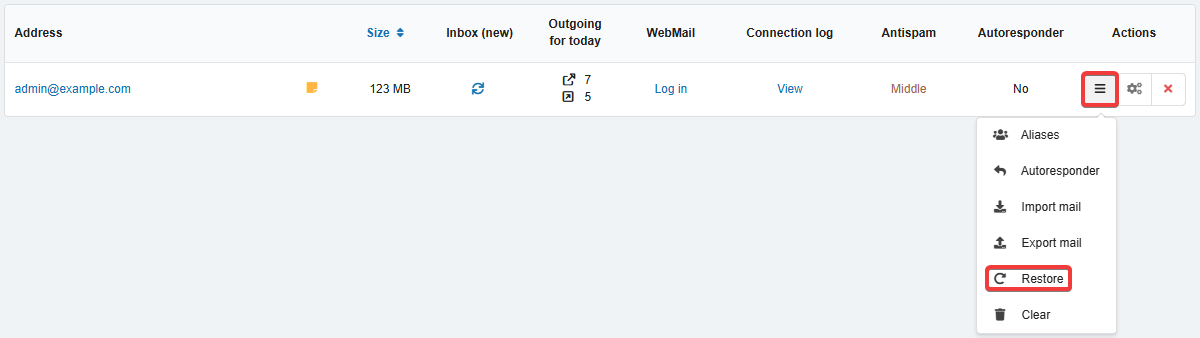
- In the mailbox menu, click "Restore":
- In the row with the backup for the desired date, click ↩️:
- Confirm the restoration with the button in the window.
- Wait for the operation to complete.
(1)