Manage cookies that are used for advertising, such as ad personalization, remarketing, and ad effectiveness analysis.
4.2.6. Configure redirect
Important points:
- Redirect does not guarantee the delivery of messages. The better protected the sender's mail domain is, the less likely it is that the message will be received by the mail server that hosts the mailbox to which the redirect is performed.
- In order to avoid possible looping, the redirect does not work for messages that are sent from mailboxes that should be redirected to.
An alternative redirect can be organized using filters in WebMail.Online or WebMail classic.
Redirect allows you to automatically forward all incoming mail to other addresses.
Enable
Important points:
- Antispam level should be at least middle.
- Mailbox should not be specified in the redirect settings of another mailbox.
- Without keeping copies enabled, forwarded mail will not be saved on our mail server and will not go to the inbox in your mailbox.
To set up a redirect, open the "Mailboxes" section, and in the mailbox menu, click "Redirect":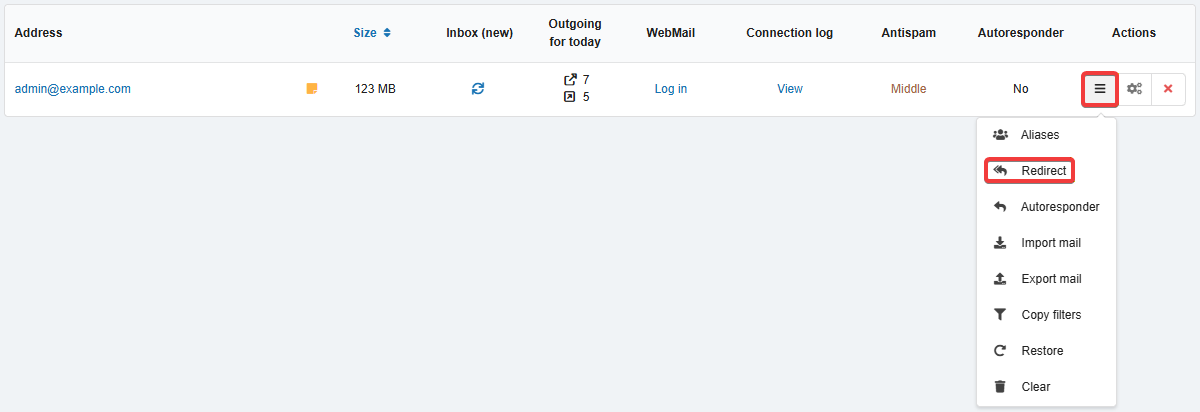
In the settings form, specify the list of addresses for forwarding and save your changes: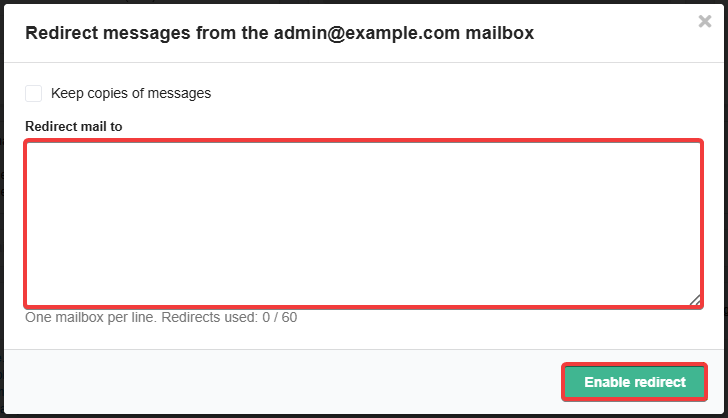
To keep copies of forwarded messages in your mailbox, enable "Keep copies of messages":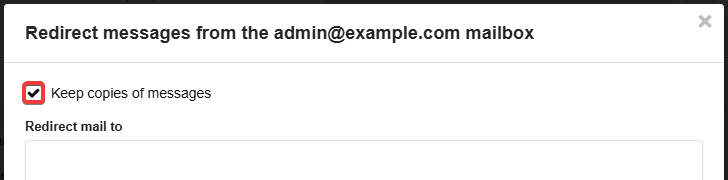
When redirect is enabled, the redirect mode and a list of addresses appear in the "Address" column of the mailbox list, below the mailbox name.
Disable
In the redirect settings, click "Disable redirect" and confirm the operation with the button in the window.
(2)