Manage cookies that are used for advertising, such as ad personalization, remarketing, and ad effectiveness analysis.
7.14. Automatic delete old files from storage
In the "Storage" section on the "Autodelete" tab, you can configure automatic deletion of files from storage: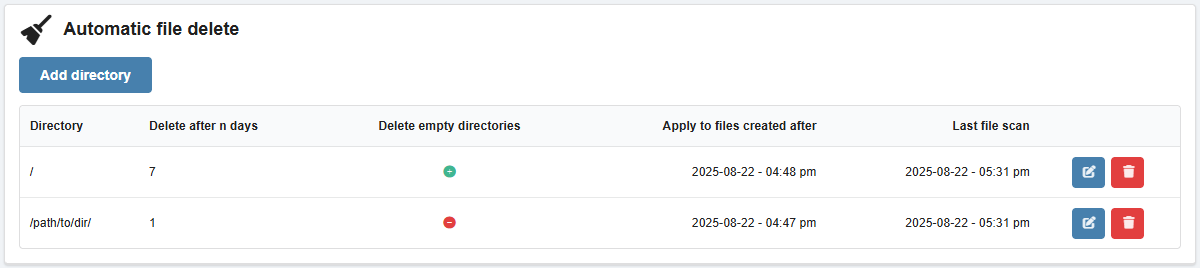
Principle of operation
When autodelete is configured for a directory, files that were created or uploaded more than a specified number of days ago are automatically deleted from that directory. For example, this can be useful when backups of data are uploaded to the storage daily, or when the storage is used for regular file exchanges that need to be cleaned up systematically.
Files that were in storage before autodelete was configured are not affected.
You can configure several rules for deleting files from different directories. Please note that if the directories in the rules overlap, the rule for the higher-level directory will also apply to the lower-level directory (for example, if the directory \dir is set to be deleted after 2 days and the directory \dir\sub is set to delete after 3 days, then files will be deleted from the \dir\sub directory after 2 days, because this directory is a subdirectory of \dir).
Besides files, empty directories can also be deleted if you want.
Configure
- Click "Add directory".
- Fill out the form and save your changes:
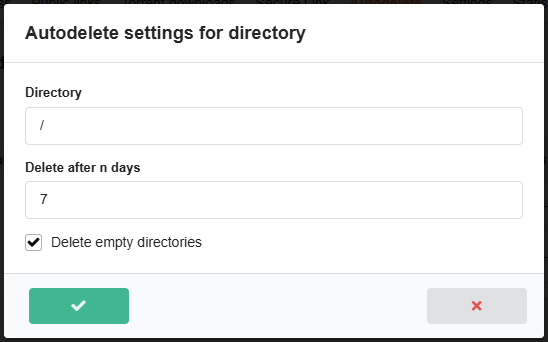
- "Directory" — the path to the directory where files will be deleted.
- "Delete after n days" — the number of days after which the files will be deleted.
- "Delete empty directories" — if enabled, empty directories that have not been used for more than 1 day will be automatically deleted once a day.
You can change the settings of added rules using the 📝 button.
Comments