Manage cookies that are used for advertising, such as ad personalization, remarketing, and ad effectiveness analysis.
7.8. Storage address
General information

The storage address is displayed in the "Storage" section in the main block and is used to access the storage contents:
- Via HTTP (direct links, public links, Secure Link).
- Via web interface.
- Via API.
Each storage always has a storage URL in the form of a subdomain of the system domain, and you can also connect custom domain.
Storage URL
Important points:
- The storage URL cannot be changed when custom domain is connected. To do this, you must first disconnect custom domain.
- The storage URL cannot be disabled.
- When deleting a storage, the assigned URL is released and can be used for a new storage if necessary.
Any unused subdomain in our domain cdn.express is used as the storage URL. The URL is specified during order and can be changed.
Change
- Next to the current storage address, click ⚙️:

- Specify the new URL and click "Change storage URL":
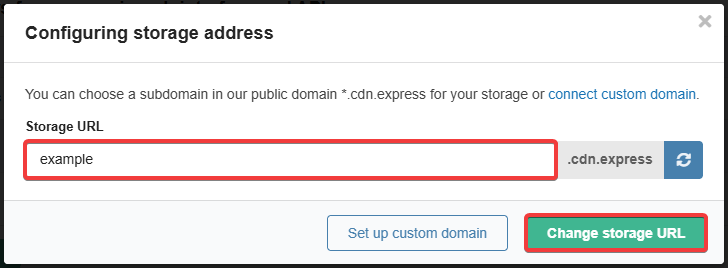
- Wait for the DNS cache to refresh and the SSL certificate to be installed (usually a few hours, maximum 24 hours).
Custom domain
Attention!
Do not use your site address as custom domain, as this will disrupt the site's operation (the storage will open instead of the site). We recommend using any free subdomain of your domain.Important points:
- After connecting, an SSL certificate from Let's Encrypt is automatically issued for the domain. Until the certificate is issued, the domain cannot be changed or disconnected.
- If the domain is served on an NS of a traffic filtering service like Cloudflare, proxying should be disabled for it.
- Connecting custom domain does not disable Storage URL, but it does block the ability to change it.
You can additionally connect custom domain to the storage. As a result, the storage will be available at two addresses — the connected domain and the storage URL.
Connect
flowchart LR
start([Connecting])
domain(Main domain)
subdomain(Subdomain)
alias[Changing ALIAS]
address["Changing A, AAAA
(not recommended)"] cname[Changing CNAME] done([Done]) start-->domain & subdomain domain-->alias domain-.->address subdomain-->cname alias-->done address-.->done cname-->done
(not recommended)"] cname[Changing CNAME] done([Done]) start-->domain & subdomain domain-->alias domain-.->address subdomain-->cname alias-->done address-.->done cname-->done
- Next to the current storage address, click ⚙️:
- Click "Set up custom domain":
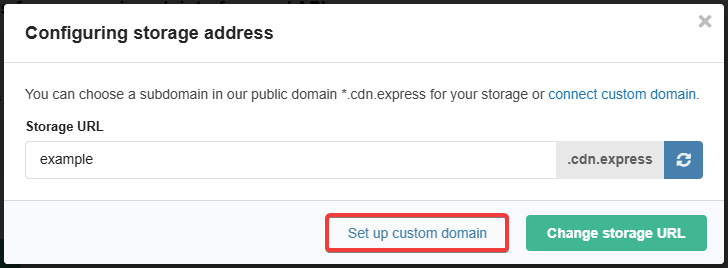
- Copy the storage address, enter the name of the domain or subdomain and click "Connect domain":
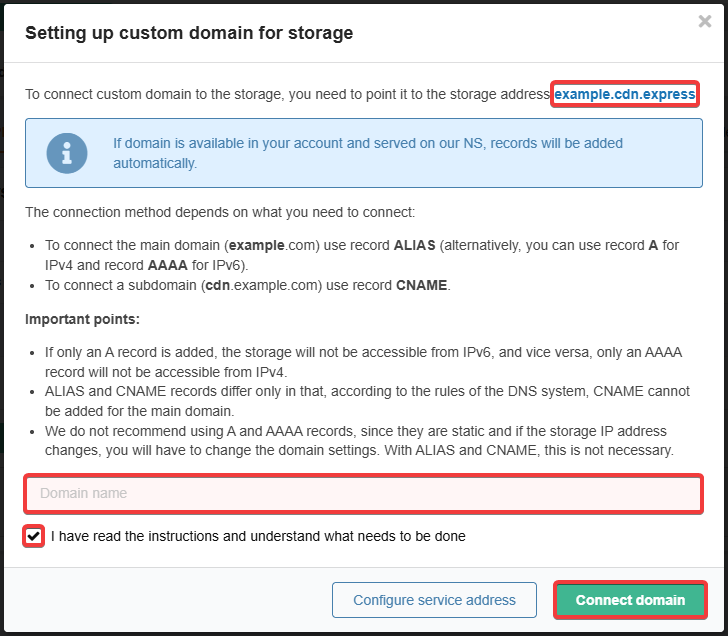
- Point the domain to the storage address:
- If the domain is on third-party NS — in the panel of the owner of these NS, add an ALIAS record (when connecting the main domain) or a CNAME record (when connecting a subdomain).
- Wait for the DNS cache to refresh and the SSL certificate to be installed (usually a few hours, maximum 24 hours).
Change
Performed in the same way as connecting.
Disable
Next to the current storage address, click ⚙️ and either click "Disable domain and switch to *.cdn.express" or click "Set up custom domain" and then "Disable domain", then confirm the operation by clicking the button in the window.