Manage cookies that are used for advertising, such as ad personalization, remarketing, and ad effectiveness analysis.
3.1.13. Domain settings presets
Domain settings presets are ready-made sets of DNS records that simplify the process of confirming or pointing a domain to work with various services. They allow you to add, change, and delete domain DNS records in accordance with the requirements of the selected service in just a few clicks and with the minimum necessary data, and in some cases without any data at all.
Available presets
If there is no preset for the service or action you need in the list, send a link to the instructions for setting it up via feedback and suggestions and we will consider adding it.
- adm.tools
- Domain setup for adm.tools mail.
- Redirecting the primary domain to an external server.
- Redirecting a subdomain to an external server.
- Google
- Google Search Console
- Confirmation of the primary domain in Google Search Console.
- Subdomain verification in Google Search Console.
- Google Sites
- Subdomain verification in Google Sites (TXT record option).
- Subdomain verification in Google Sites (CNAME record option).
- Connecting a subdomain to Google Sites.
- Blogger
- Connecting Blogger to the main domain with www.
- Connecting Blogger to a subdomain.
- Redirect Blogger from the main domain without www to the blog address.
- Google Workspace (formerly G Suite)
- Confirmation of the primary domain in Google Workspace.
- Setting up a domain for Google Workspace email.
- Facebook
- Domain verification in Facebook Business.
- Amazon
- Verification of the primary domain in Amazon SES.
- Apple
- Connecting a domain to iCloud Mail.
- eSputnik
- Domain confirmation and setup for eSputnik.
- Framer
- Connecting the primary domain to Framer.
- Connecting a subdomain to Framer.
- GitHub
- Connecting the primary domain with www to GitHub Pages.
- Connecting a subdomain to GitHub Pages.
- Connecting the primary domain to GitHub Pages (option with ALIAS record).
- Connecting the primary domain to GitHub Pages (option with A and AAAA records).
- Horoshop
- Connecting the primary domain to Horoshop (option with A-records).
- Connecting the primary domain to Horoshop (option with ALIAS records).
- Notion
- Connecting a domain to Notion Sites.
- Prom.ua
- Connecting the primary domain to Prom.ua.
- Proton
- Domain verification in Proton Mail.
- Setting up a domain for Proton Mail.
- Configuring anti-spoofing for Proton Mail.
- SendPulse
- Connecting the primary domain to SendPulse.
- Configuring a domain for tracking SendPulse mailings.
- Domain setup for SendPulse (our MX, site with us).
- Domain setup for SendPulse (our MX, site not hosted with us).
- Domain setup for SendPulse (not our MX, site not hosted with us).
- Shop-Express
- Connecting the primary domain to Shop-Express (NS option).
- Connecting the primary domain to Shop-Express (IP option).
- Connecting a subdomain to Shop-Express (NS option).
- Connecting a subdomain to Shop-Express (IP option).
- Smart Sender
- Connecting the primary domain to Smart Sender.
- Connecting a subdomain to Smart Sender.
- Shopify
- Connecting the primary domain to Shopify.
- Vigbo
- Connecting the primary domain to Vigbo (the service domain ends with vigbo.com).
- Connecting the primary domain to Vigbo (the service domain ends with gophotoweb.com).
- WayForPay
- Connecting the primary domain to WayForPay.
- Weblium
- Connecting the primary domain to Weblium (NS option).
- Connecting the primary domain to Weblium (IP option).
- Connecting a subdomain to Weblium (NS option).
- Connecting a subdomain to Weblium (IP option).
- Wix
- Connecting the primary domain to Wix (IP option).
- Connecting the primary domain to Wix (NS option).
- Connecting a subdomain to Wix (IP option).
- Connecting a subdomain to Wix (NS option).
- Webflow
- Connecting the primary domain with www to Webflow.
- Connecting the primary domain without www to Webflow.
- Connecting a subdomain to Webflow.
- Zoho
- Domain verification in Zoho (TXT record method).
- Domain verification in Zoho (CNAME record option).
- Configuring a domain for Zoho Mail.
Set preset
- Open the "Domains" section.
- Save to file the current DNS settings (just in case).
- In the domain menu, click "Presets".
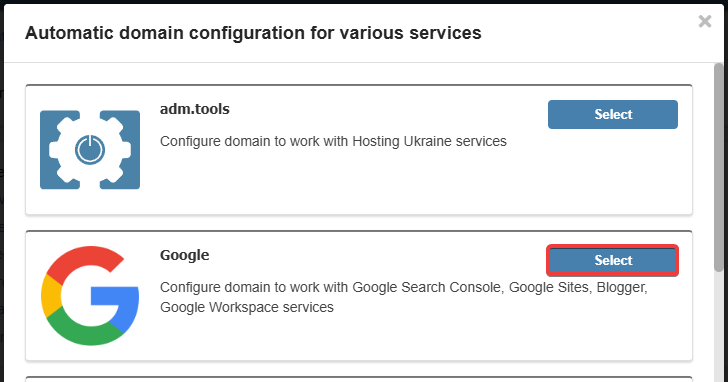
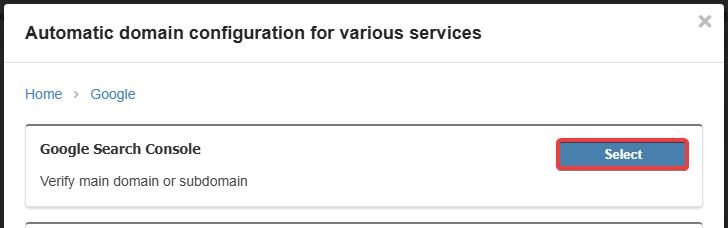
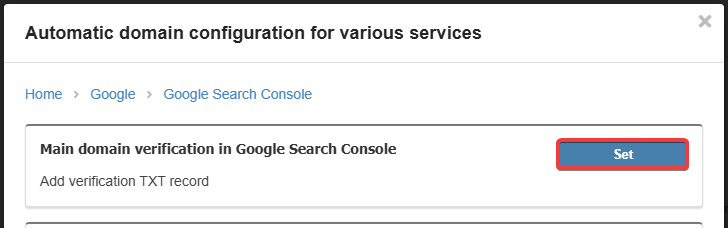
- Select the service, action, and click "Set":
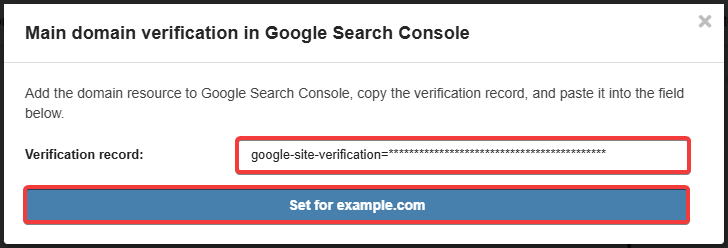
- If data is requested, specify it and click "Set":
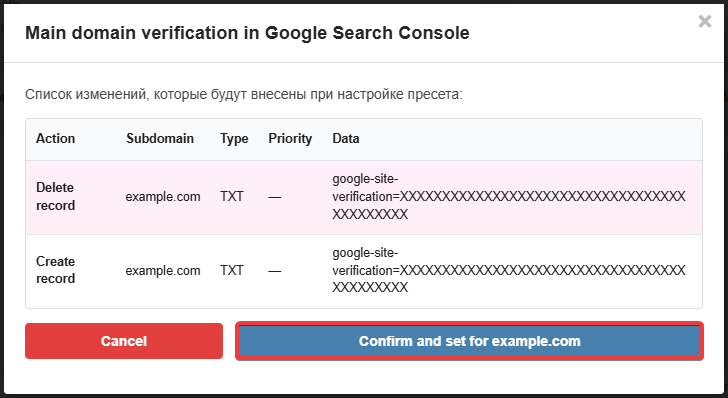
- Check the list of changes carefully and, if everything is correct, click "Confirm and set":
- Wait for the DNS cache to refresh (usually a few hours, maximum 24).
(3)
Comments