Manage cookies that are used for advertising, such as ad personalization, remarketing, and ad effectiveness analysis.
3.1.15. DNSSEC
Important points:
- The current domain registrar must be our company.
- The domain zone must be open for registration with our company (present in the list on registration page).
- Some zones do not yet support DNSSEC, but are actively working on implementation. As soon as the registry has support, the ability to enable it is immediately available from us.
- When DNSSEC is enabled, changing NS for a domain is not available. To change NS, you must completely disable DNSSEC.
About DNSSEC
In standard DNS, the authenticity of the received data is not confirmed in any way. Because of this, there is a risk that when DNS records of a domain are received, the data may be spoofed in the process of transmission by attackers, and visitors will unknowingly end up on the attacker's server instead of the real server with the site. DNSSEC (Domain Name System Security Extensions) is a security extension for DNS that solves this problem.
DNSSEC technology provides two major improvements over standard DNS:
- Data Origin Authtntication. Allows you to make sure that the data is coming from exactly the right zone. For example, whether the records that example.com returns are real example.com records, and if the data is from a cache, whether the data is from the real example.com. For this purpose, DNSSEC builds a chain of trust from the root DNS zone to the DNS records of a particular domain using digital signatures. At each step, you can be sure that the child zone has the trust of the parent zone and that the zone's data has not been compromised.
- Data Integrity Protection. Allows you to verify that the data has not been modified during the delivery process. For example, if there is example.com data, is it the unmodified example.com data that the example.com administrator created? It is important to note that if there is spoofing, DNSSEC does not correct the data, but only indicates that there has been a change.
DNSSEC complements the standard DNS, but does not replace it. That is, either standard DNS (unvalidated data) or standard DNS plus DNSSEC (validated data) can be used to retrieve domain data. In the first case, the data may be spoofed during delivery and remain undetected, while in the second case, the data received via DNS is additionally verified by DNSSEC data and the spoofing will be immediately detected.
Using DNSSEC ensures that site visitors are directed to the correct server and eliminates the possibility of data spoofing and undetected redirection to a malicious server.
Enable
When the domain is served on our NS, enabling is done at the click of a button, all key generation and DNS record addition is fully automatic.

Key tags with length less than 5 digits are displayed with zeros at the beginning after addition.
When the domain is served on third-party NS, only the DS record is added from our side, all other configuration actions are performed in the control panel of the third-party NS owner.
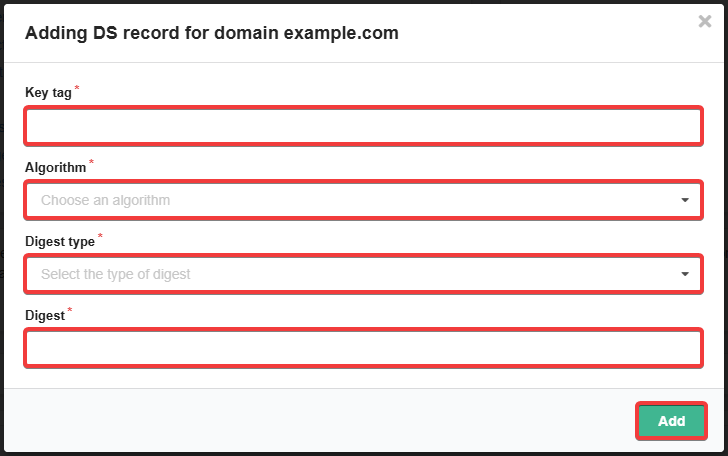
Disable


(3)
Comments
В чем может быть проблема? И где это проверить/посмотреть?
Domain Information
Name
SEVEN****.COM
Registry Domain ID
2205101767_DOMAIN_COM-VRSN
Registered On
2017-12-27T09:58:26Z
Expires On
2026-12-28T11:59:59Z
Updated On
2025-11-29T11:40:31Z