Manage cookies that are used for advertising, such as ad personalization, remarketing, and ad effectiveness analysis.
2.14.1.20. Disable thumbnail generation
In WordPress, as in most CMS platforms, there is a feature for generating thumbnails of uploaded images if they are large in size. This approach significantly speeds up page loading by reducing the amount of data transmitted to the user, but at the same time creates multiple copies of each image in different sizes (depending on the image size and CMS settings, there can be anywhere from 2 to 5 thumbnails for each image). Thumbnail generation can be disabled within the CMS itself, but they can also be created by plugins or themes — in which case they will need to be disabled separately.
Attention!
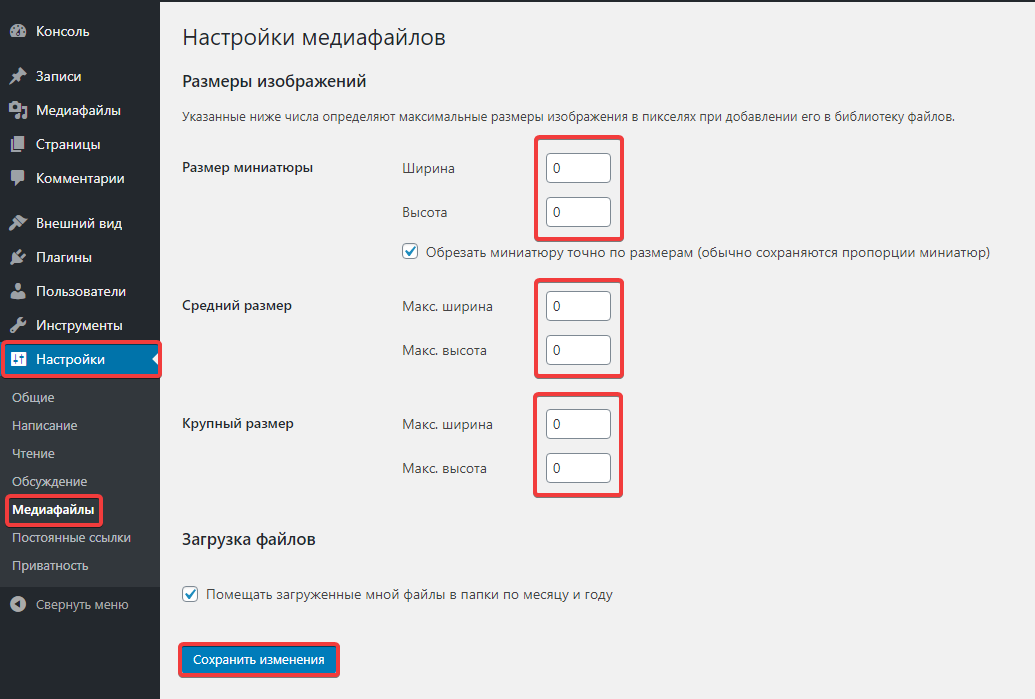
Disabling the generation of thumbnails may slow down the loading speed of your site, so we do not recommend disabling this feature unless absolutely necessary.- Go to the "Settings → Media" section.
- Set all image size settings to 0 and save the changes:
- Manually delete any thumbnails you don't need. Attention! These changes do not affect thumbnails that have already been generated.
(1)