Manage cookies that are used for advertising, such as ad personalization, remarketing, and ad effectiveness analysis.
2.17.8. Analysis of high resource consumption
Main reasons of load
Number of requests and script execution on site
One of the main reasons for high server load is an increased number of requests to the site, combined with the inefficient code of its scripts, which are executed for each visitor. Thus, the more efficiently the site's scripts perform for each visitor, the greater the overall load the site can handle.
Search engine bots also affect site traffic. Therefore, when search engines index your site, it can place an increased load on the server. You can set indexing parameters for your site to reduce the number of requests from bots via the robots.txt file or through the webmaster tools on the search engine's side.
If necessary, you can restrict access to the site to reduce server load or perform maintenance tasks.
Database queries
The load can be affected by database queries from the site's scripts.
Database queries should not take longer than 15 seconds to execute. Any queries that take longer than 5 seconds can be viewed in the "Slow queries" section.
In this case, you need to optimize the database. You can find some examples of optimization here and here.
Malicious code and outgoing connections
Malicious scripts (if present) can generate unwanted traffic on the site and server.
You can check for infected files by running an antivirus scan on your hosting account or by using third-party tools.
Malicious scripts can establish external connections to other sites, which may cause the site to take longer to process requests. You can view the list of outgoing connection attempts in the "Outgoing connections" section.
Methods of load analysis
Is there a way to see which specific sites or scripts are causing the increased load?
Unfortunately, no. Information on how CPU time is calculated can be found here.
Often, the cause of the problem can be identified by manually analyzing site access logs and information from the sections " Web server load" and "MySQL server load" sections.
Manual analysis
You can access web server logs and load graphs for analysis in the "My sites → Site access logs" and "My sites → Request statistics".
When analysing, it is important to pay particular attention to scripts that use POST requests and numerous AJAX requests. Such requests typically generate the heaviest load due to the nature of the technology involved.
Example of load on web server
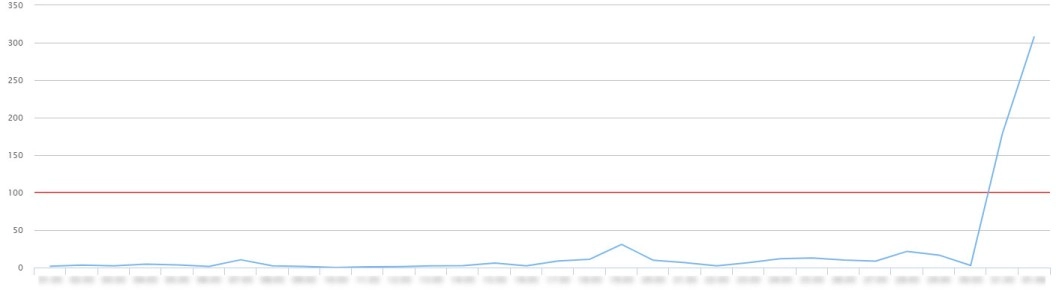
Such a spike in resource usage is usually caused by a DDoS attack or a site scan aimed at hacking the site.
You need to analyze the server logs, paying particular attention to unusual POST requests.
To protect WordPress sites from attacks on xmlrpc.php and wp-login.php, following steps 8-10 in the guide can help.
(11)