Manage cookies that are used for advertising, such as ad personalization, remarketing, and ad effectiveness analysis.
4.3.2.1.4. "Disable" mailbox
To "disable" mailbox without deleting it, you can use WebMail classic filters and use them to delete all incoming emails and/or configure autoresponder.
- Create new WebMail classic filter rule.
- Set conditions for the rule and click "Save":
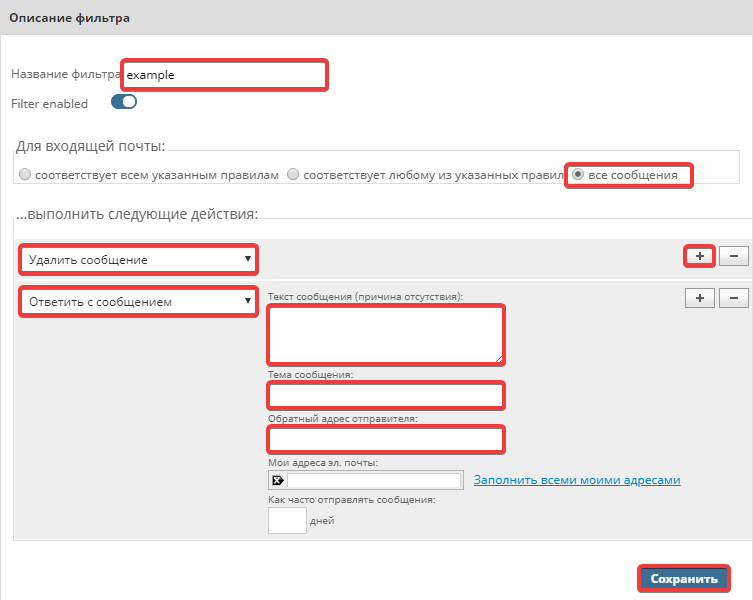
- "Filter name" — enter any name for the filter.
- "For incoming mail" — select "all messages" to apply filter action to all incoming messages.
- "…perform the following actions" — in dropdown list select "Delete message" to delete all incoming email.
- Click the "+" button to add another action.
- In settings of appeared new action select "Reply with message" and set following values:
- "Message text" — email text that will be sent in response to sender.
- "Message subject" — email subject (
subjectheader) that will be sent in reply to sender. - "Reply-to address" —
fromheader specifying reply message sender.Warning!
We strongly advise against using third-party email addresses within the same or a different domain, as this may cause delivery issues for the entire domain. - Do not fill in "My email addresses" and "How often to send messages" parameters.