Manage cookies that are used for advertising, such as ad personalization, remarketing, and ad effectiveness analysis.
2.3.1. Dedicated IP for hosting
By default, all sites on a hosting account work on a shared IP. To have one or more sites work on a separate IP address, you can use a dedicated IP.
Order
Important points:
- Order:
- The service is paid daily from the balance. To place an order, the balance must have enough funds to pay for at least 1 month of service use.
- Only Ukrainian IPv4 addresses are available, and only for hosting accounts in Ukraine.
- Addresses are assigned automatically and cannot be selected. Addresses that have already been ordered for this service are provided first (if they are available).
- All requested addresses will be from the same subnet. It is not possible to get an address from another subnet.
- Cannot be ordered for hosting accounts on test period.
- Dedicated IP:
- Links to the hosting account; can be connected to one or more sites within a single hosting account.
- You can order any quantity for a single hosting account.
- Cannot be transferred between hosting accounts.
- Open the "Extra services" section.
- At the top of the page, click "Dedicated IP".
- Read the cost information and click "Order".
- Set up the dedicated IP for the desired sites.
Configure
Important points:
- Dedicated IP:
- Can be connected to one or multiple sites within a single hosting account.
- Technical site check does not take into account dedicated IP, so it may report that the address record is not configured correctly, even though it is not.
- If the domain is served on third-party NS, you need to make changes to its settings not with us, but in the panel of the owner of these NS.
- In the "Site settings" section:
- In the "Dedicated IP" row, select a dedicated IP instead of a shared IP:
 After selecting the dedicated IP, an additional option will appear: "Open site when specifying dedicated IP in browser address bar". You can enable this option if the site needs to accept requests not only by domain name, but also directly by IP (it is better not to enable this option unless absolutely necessary):
- Disable IPv6 autoconfiguration.
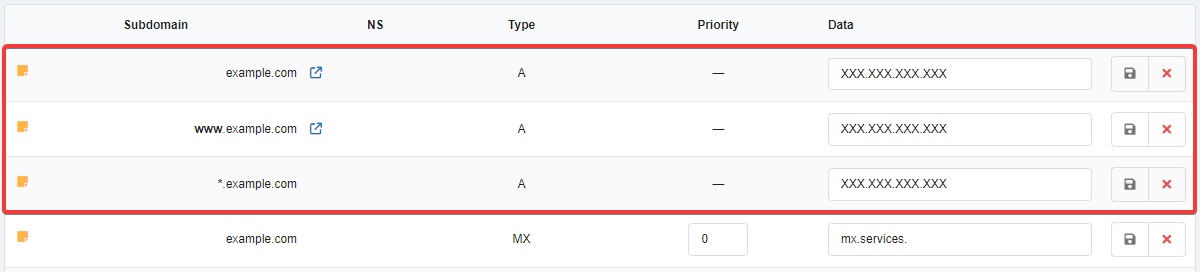
- In the "Domain settings (DNS)" section:
- Wait for the DNS cache to refresh (usually a few hours, maximum 24).
- Check the site operation.
You can find out the IP address that opens the site by using the ping command.
Outgoing connections
After ordering a dedicated IP, all outgoing connections from the hosting account will use the dedicated IP instead of the server's direct IPv4 address. If you have multiple dedicated IPs, you can choose any of them for outgoing connections. For more information, see Outgoing connections.
It is important to keep in mind that when sending a request to a domain rather than an IP address, IPv6-enabled servers may often prefer it over IPv4. This can make it appear that the dedicated IP is not being used. To avoid this, specify IPv4 enforcement in connections to other servers, for example:
- Use the IPv4 address of the target server as the host.
- In PHP cURL, use
setoptto force IPv4 for the active session.:curl_setopt($connection, CURLOPT_IPRESOLVE, CURL_IPRESOLVE_V4); - In PHP functions that use socket context options (e.g.
file_get_contents), explicitly specify the IP address for the outgoing connection:$opts = array( 'socket' => array( 'bindto' => 'xxx.xxx.xxx.xxx:0', ), ); $context = stream_context_create($opts); echo file_get_contents('https://example.com/', false, $context);Instead of
xxx.xxx.xxx.xxxspecify the necessary IP available for the site, instead ofhttps://example.com/— address of the target resource. Use0as the port — this way it will be substituted automatically.
Disable
- In the "Domain settings (DNS)" section, instead of the dedicated IP, specify the main IP addresses of the hosting account.
- In the "Site settings" section, in the "Dedicated IP" field, select a shared IP instead of the dedicated IP.
- (If the dedicated IP is no longer needed) Disable the dedicated IP service.
(4)