Manage cookies that are used for advertising, such as ad personalization, remarketing, and ad effectiveness analysis.
1.17. Configure notifications
Notifications are sent in the language that set in the control panel.
Sending methods
Notifications are sent in the following ways:
- Email — to account email (primary method).
- Telegram — via our Telegram bot (if you have a Telegram account linked).
- Discord — via our Discord bot (if you have a Discord account connected).
Notification groups
All notifications are divided into groups, their configuring is performed in personal data on the "Notifications" tab: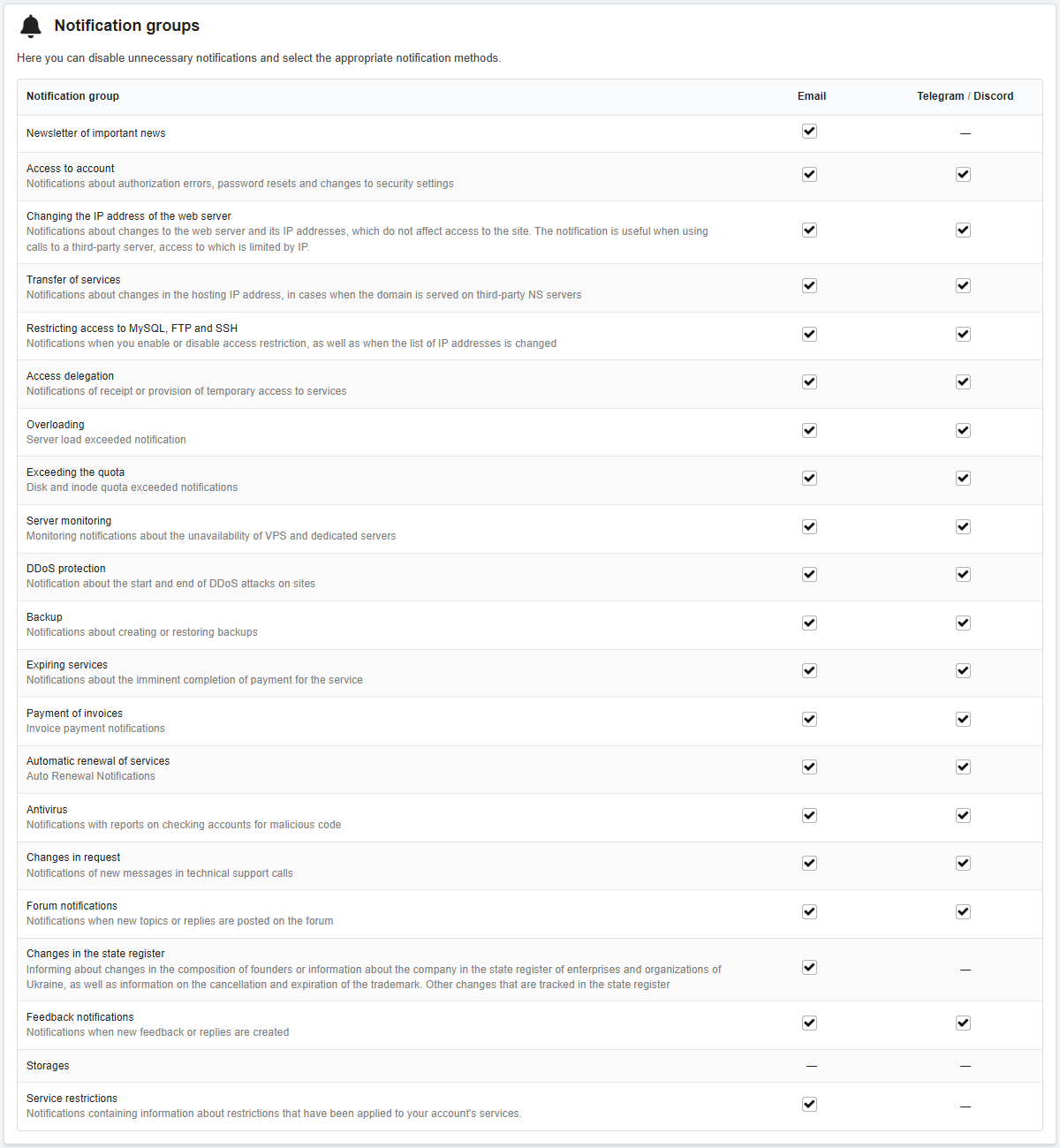
In the row of each group, you can select the method of sending — to email or to Telegram / Discord, or disable them.
Some important groups (e.g. expiration reminders) cannot be completely disabled. At least one sending method must be enabled for them. If sending only to Telegram / Discord is enabled for an important group of notifications, then when you unlink all Telegram and Discord accounts, sending to email will be automatically enabled for them.
Notifications from the "Access to account" group are sent to email only and are not disabled.
Delegated services
Notes:
- Notifications for delegated services are enabled by default.
- Notifications are sent based on the notification groups settings.
To configure notifications for delegated services to you, use the switcher in the "Access delegation" section in the "You have been granted access" block in the "Notifications" column: