Manage cookies that are used for advertising, such as ad personalization, remarketing, and ad effectiveness analysis.
2.5.2.2.3.4. Configure key-based authentication in WinSCP
When connecting via SFTP or SCP in WinSCP, key-based authentication can be used instead of passwords.
- Generate a key pair using any of the methods.
- Add a public key on the server.
- Convert the private key to the
.ppkformat using the PuTTYgen utility:- Run
puttygen.exe. - In the main menu, click on "Conversions → Import key":
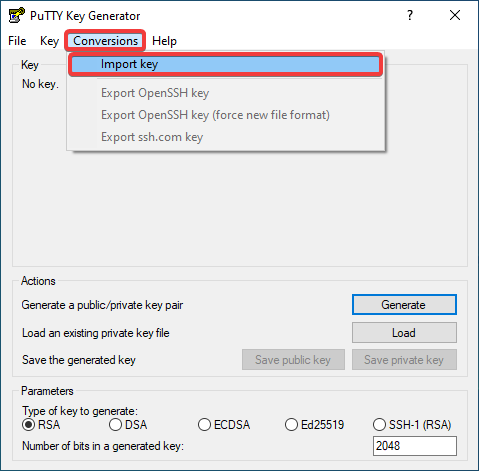
- Select the generated private key file
id_rsa. - Click "Save private key":
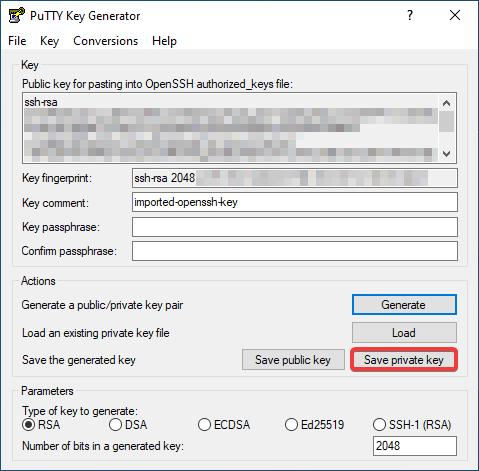
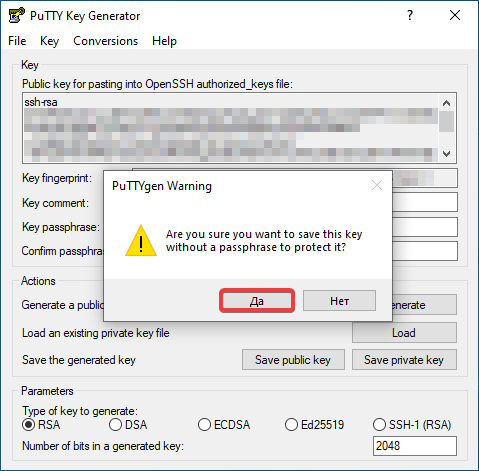
- If a warning about the absence of a passphrase appears, click "Yes" to continue without it (or you can click "No" to return and specify it):
- Save the obtained private key in a secure location.
- When configuring a connection via SFTP or SCP in WinSCP, instead of entering a password, do the following:
- Click "Advanced":
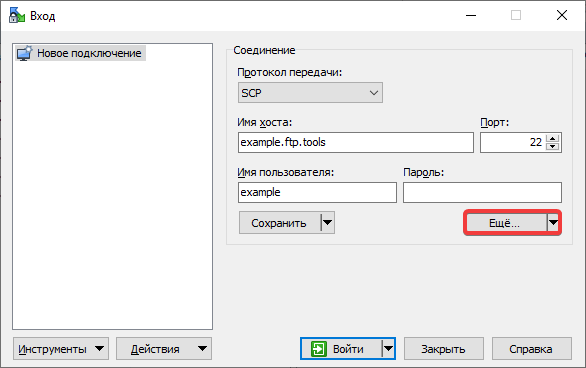
- In the section "SSH → Authentication", in the field "Private key file", use the button with three dots to specify the path to the previously saved private key and click "OK":
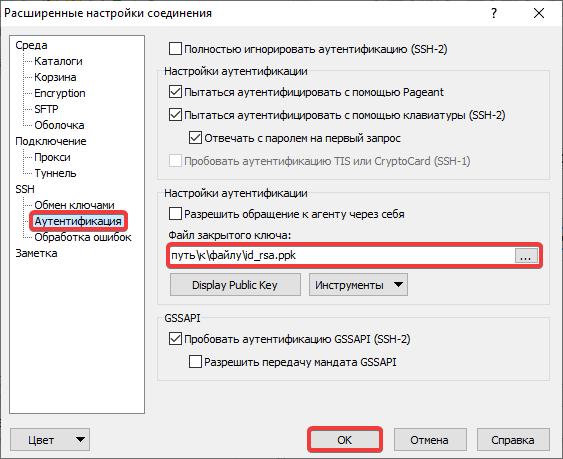
- Check the connection.