Manage cookies that are used for advertising, such as ad personalization, remarketing, and ad effectiveness analysis.
1.1.4. Verification
Important points:
- Accounts of Ukrainian legal entities are automatically verified after the first payment is received from the company's settlement account.
- When verifying via BankID, the full name is automatically filled in and the address is updated for accounts of individuals and FOPs.
- All provided data is governed by the privacy policy.
- Open the "Verification" section.
- Select the appropriate verification method:
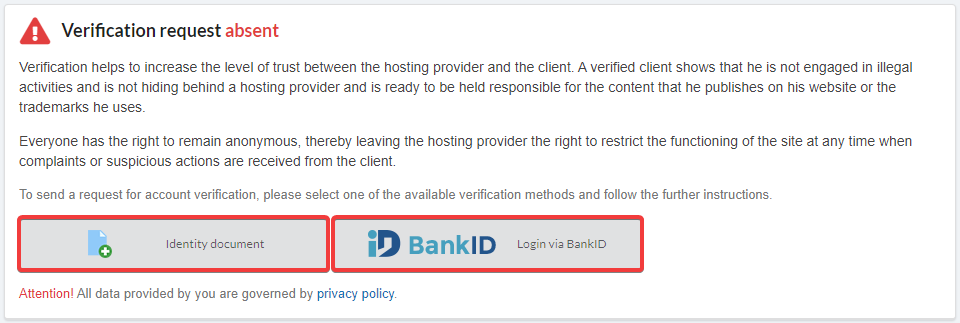
- Submit your application using the selected method:Attach files or take a photo using the webcam and click "Submit verification request":
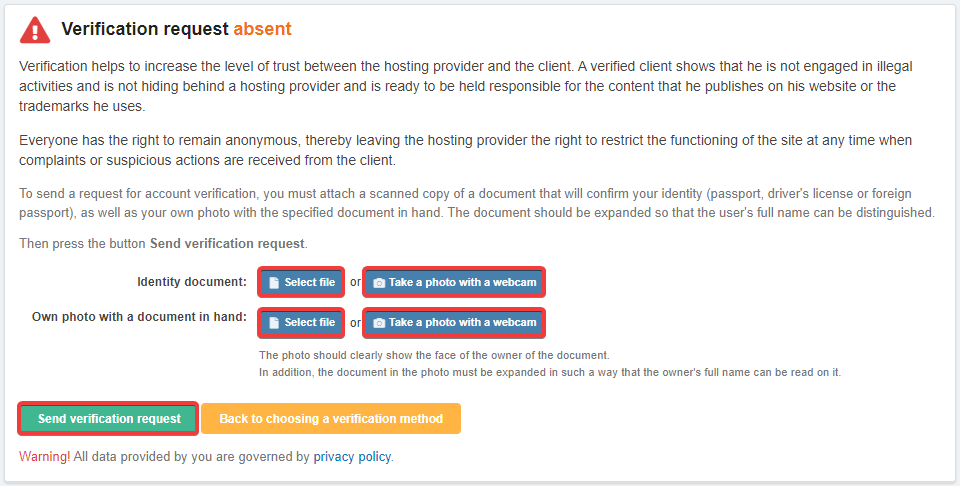
- Document confirming identity — a scanned copy or photo of the document where all data is clearly visible.
- Personal photo with document in hand — your photo with the above-attached document in hand. The photo must clearly show the face of the document owner and the document itself. The document should be unfolded in such a way that the photo and full name of the owner are visible.
- Click "Verification via BankID":
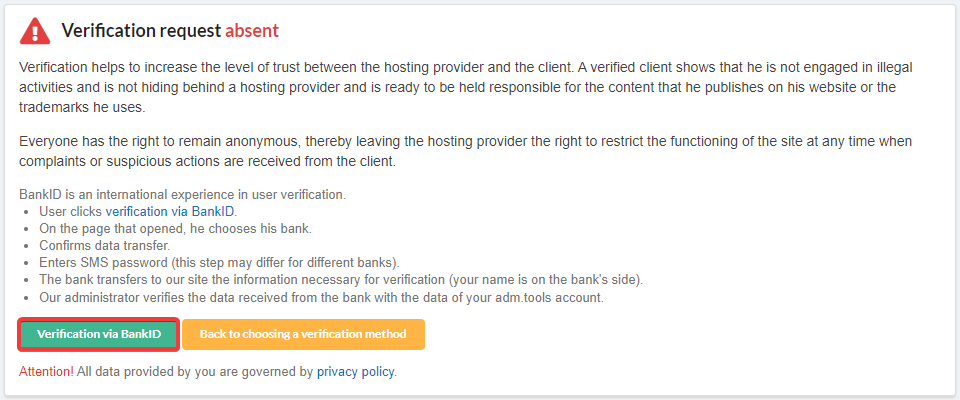
- Use one of the identification channels available on the official BankID site:
- Banks:
- PrivatBank.
- monobank.
- ID card (passport).
- Electronic digital signature (EDS).
- MobileID.
- Wait for the results of the application review within 2 business days from the date of submission.
(4)