Manage cookies that are used for advertising, such as ad personalization, remarketing, and ad effectiveness analysis.
2.6.1.20. MySQL query log (General Query Log)
Attention!
For business hosting only.General Query Log (General Query Log) contains all connections and received SQL queries to all databases of the hosting account. This log can be useful in the process of debugging site scripts and optimizing interaction with databases, when you need to know which queries were sent to MySQL-server (for example, when generating dynamic SQL queries).
The log is written to a system table during the day and moved to the hosting account to the ~/.system/mysql/general-log/ directory at the beginning of the next day.
Enable and disable
Attention!
Enable logging only when necessary and disable it as soon as you get the necessary data. Collecting and saving logs uses disk space of your hosting account and reduces MySQL performance, so logging is disabled by default and it is not recommended to leave it on for a long time without need.To enable or disable logging, open the "MySQL performance" section and click "General Query Log" at the top of the page. The operations are performed without restarting MySQL.
If the log for the current day becomes larger than 500 MB, logging is automatically disabled. Logging can only be enabled manually after deleting logs or on the next day when a new log starts.
View
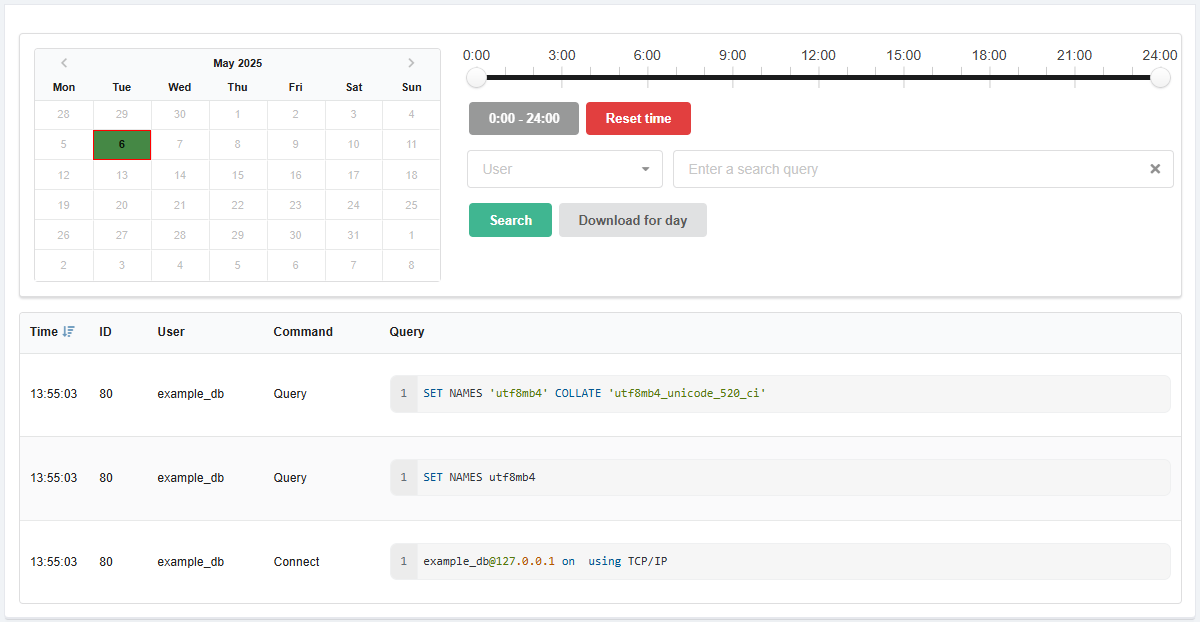
Date and filters
Calendar. Allows you to select the day for which the log will be displayed. In the calendar:
- Light green — days for which logs are available.
- Dark green — selected day.
- Red frame — current date.
Time filter. Allows you to view the log not for the whole day, but for a selected time period.
Search. Allows you to filter the log by database user and presence of certain text in queries.
Download. The "Download for day" button downloads the log for the day selected in the calendar.
Log
- "Time" — time of query receipt.
- "ID" — connection identifier (
thread_id). - "User" — database user who sent the query.
- "Command" — for example, "Connect" (connection to MySQL server), "Query" (SQL query to MySQL server), "Change user" (changing database user for the current connection), etc.
- "Query" — text of query.
Delete
In the "MySQL performance" section in the upper right corner of the page, click "Delete logs".