Manage cookies that are used for advertising, such as ad personalization, remarketing, and ad effectiveness analysis.
5.3.2. Check disk space
Capacity
To check the available disk space, connect to the server via SSH or VNC and run the following command:
df -h
The result will look like this: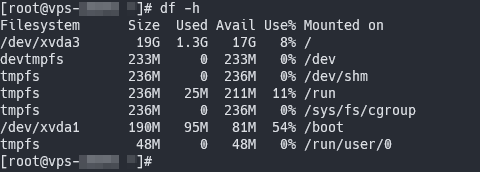 Columns:
- "Size" — total disk space.
- "Used" — the amount of space used by files.
- "Avail" — the capacity available for use.
- "Use%" — percentage of space used.
- "Mounted on" — the disk's mount point.
Inodes
Due to technical limitations of the file system, only a strictly limited number of files and folders can be stored on any disk.
To check for inodes on the disk, connect to the server via SSH or VNC and run the following command:
df -i
The result will look like this: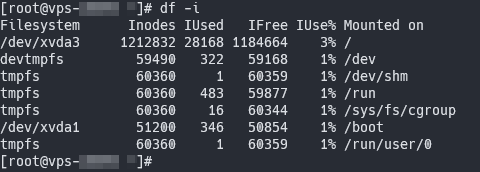 Columns:
- "Inodes" — the total number of available inodes.
- "IUsed" — the number of inodes used.
- "IFree" — the number of free inodes.
- "IUse%" — the percentage of inodes in use.
- "Mounted on" — the disk's mount point.