Manage cookies that are used for advertising, such as ad personalization, remarketing, and ad effectiveness analysis.
2.5.1.7. Symbolic links
Notes:
- The root directory of the hosting account always contains the symbolic link to tmp directory.
- Symbolic links can be created using console commands.
Symbolic link (symlink) is a special file containing the address of another file or directory. When accessing a symbolic link, the file or directory it points to is opened. Such a link can be used to organize access to one directory from the directories of several sites without creating its copies.
The permissions of a symbolic link are always shown as rwxrwxrwx and have no effect. The permissions of the link itself are determined by the permissions of the directory in which it is located. The permissions of the file or directory pointed to by the link are determined by the target file's or directory's own permissions.
Create link
- Find the file or directory you want to link to.
- Select the found file or directory, right-click on it and select "Create symlink" in the context menu:
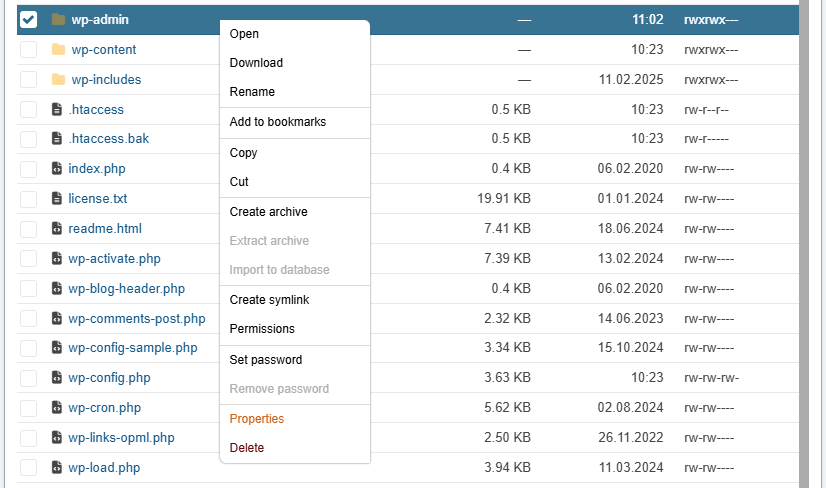
- Navigate to the directory where you want to locate the link.
- Right-click and select "Insert symlink" in the context menu:
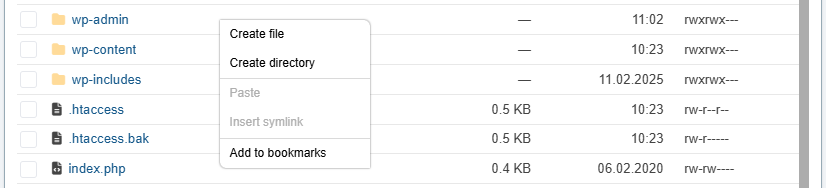
- Enter the name of the link and click ✅.
Delete link
A symbolic link is deleted like a regular file or directory. It is enough to select it, right-click on it and select "Delete" in the context menu. The file or directory pointed to by the link is not affected.
(2)
Comments