Manage cookies that are used for advertising, such as ad personalization, remarketing, and ad effectiveness analysis.
2.14.3.20. Disable product count in OpenCart categories
Default OpenCart functionality that counts products in categories is too resource-intensive and can cause huge page processing delays and high server load. It is recommended to disable it for sites. Disable procedure depends on the OpenCart version in use:
- Open the site admin panel.
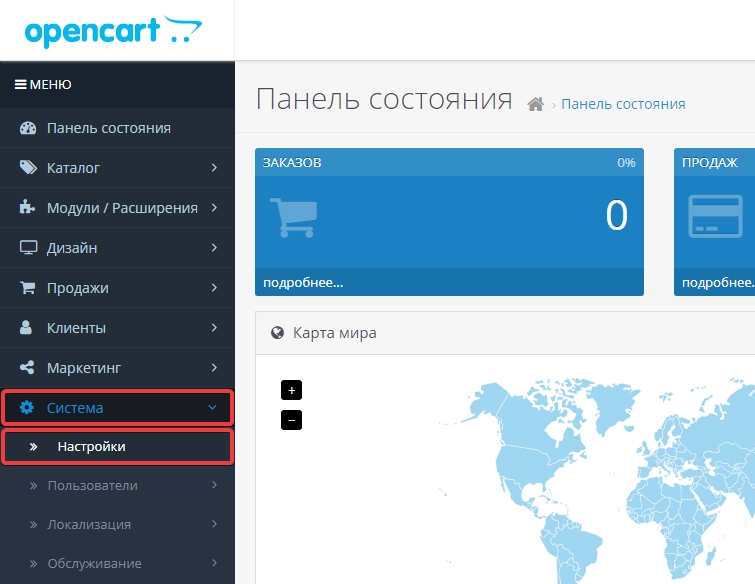
- Go to "System → Settings":
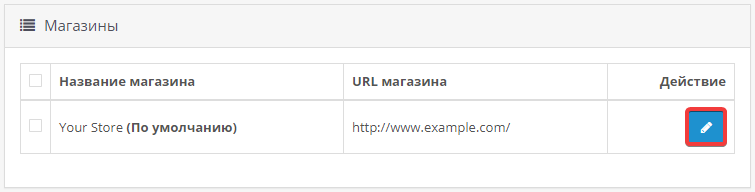
- To the right of the store name, click "Edit":
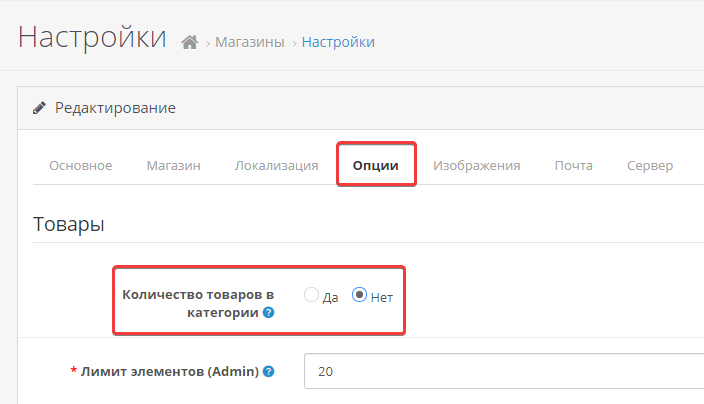
- On the "Options" tab, next to "Products per category", select "No":
- Save changes by clicking "Save" in the upper-right corner of the page:

- Check the site operation.
If you use OpenCart version 1.5.1 or lower, you must disable the count function directly in site code. To do this, follow these steps:
- Edit the
catalog/controller/common/header.phpfile:- At approximately line 200, find the following line and comment it out by adding
//at the beginning:$product_total = $this->model_catalog_product->getTotalProducts($data); - Find the line:
'name' => $child['name'] . ' (' . $product_total . ')',And replace it with this:
'name' => $child['name'], - In the end, you should get the following:
//$product_total = $this->model_catalog_product->getTotalProducts($data);
$children_data[] = array</b></br>
'name'  => $child['name'],</b></br>
'href'  => 'href'  => $this->url->link('product/category', 'path=' . $category['category_id'] . '_' . </b>  </br>
);
- Check the site operation.