Manage cookies that are used for advertising, such as ad personalization, remarketing, and ad effectiveness analysis.
2.14.3.18. Configure 404 page in OpenCart
Attention!
Custom 404 pages will not work correctly for URLs that mentionpagespeed if optimization settings are enabled. To resolve the issue, disable optimization settings or avoid using links with similar keywords.
In OpenCart, 404 error page is generated directly in CMS itself, so instruction for configuring own 404 page will not produce the required result.
You can create a custom 404 page in OpenCart by:
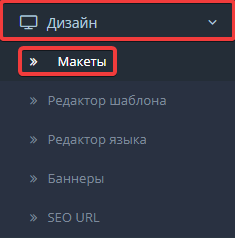
- Go to "Design → Layouts":
- Add a new layout by clicking "+":

- Specify data to create layout:
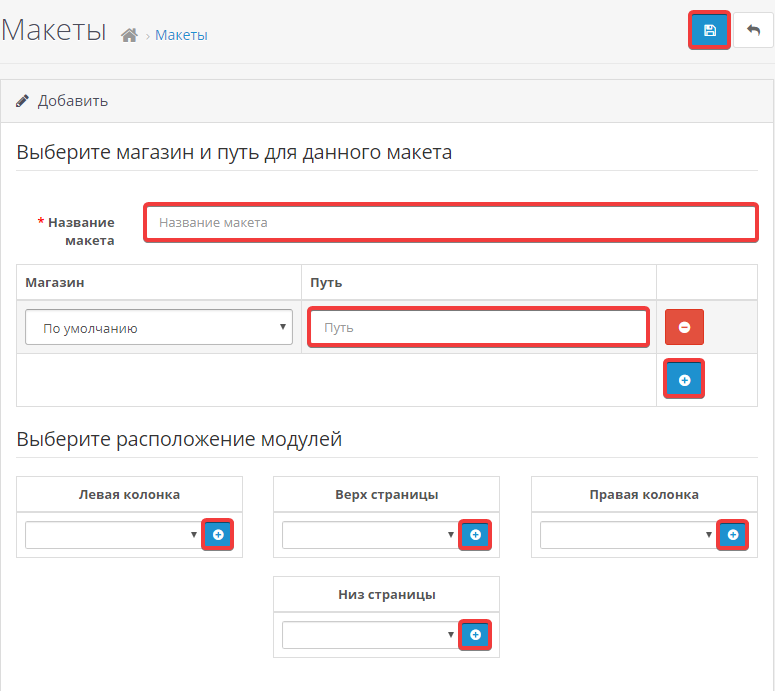
- "Layout name" — specify an arbitrary layout name.
- In table with columns "Store" and "Path" click "+" and in "Store" field select your active store, and in "Path" field specify
error/not_found. - In the "Select module location" section, click on "+" to add a block with the desired element to the desired panel. The selection of such blocks should be made at your own discretion.
- Save the changes.
To change 404 page text, you must modify
catalog\language\ru-ru\error\not_found.php, where instead of ru-ru you must specify language you use.
Only a few parameters will be specified in the file:
- Heading:
// Heading $_['heading_title'] = 'Requested page not found!'; - Page text:
// Text
$_['text_error'] = 'Unfortunately, the page you requested was not found. You probably specified a non-existent address, the page was deleted, moved or is temporarily unavailable now!';
You can change both parameters to the ones you need. If you need to add any styles or images, you can use standard HTML tags. For example, to output an image, you can do this:
<?php
// Heading
$_['heading_title'] = 'Requested page not found!';

// Text
$_['text_error'] = 'Unfortunately, the page you requested was not found.
 <img src="https://example.com/404.png">';
(1)
Comments
Вбудованими засобами OpenCart навряд чи таке можливо, але можна зробити через .htaccess за аналогією з інструкцією — https://www.ukraine.com.ua/uk/wiki/hosting/web-servers/apache/htaccess/own-404/
Як для 403 теж саме зробити?