Manage cookies that are used for advertising, such as ad personalization, remarketing, and ad effectiveness analysis.
2.14.3.15. Install extensions via FTP in OpenCart
The article applies to OpenCart 2. In OpenCart 3, extension installation is performed without FTP.
- In FTP access restrictions provide site FTP access to hosting in one of two ways:
- Or completely disable access restriction for extension installation time.
- Or find direct IP addresses of hosting account and add them to allowed.
- Open the site admin panel.
- Go to "System → Settings".
- To the right of the store name, click "Edit".
- Switch to the "FTP" tab and enter your FTP connection credentials:
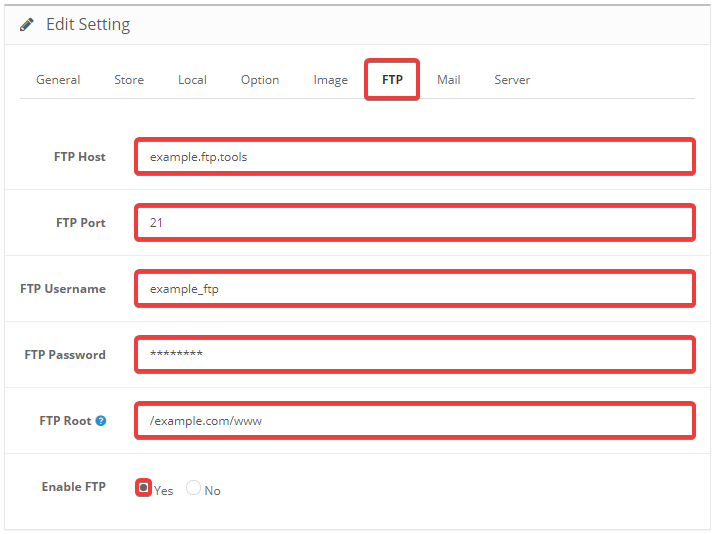
- "FTP Host" — FTP server address.
- "FTP Port" —
21. - "FTP Username" — FTP user login.
- "FTP Password" — FTP user password.
- "FTP Root" — the path to the site root directory from FTP root (without
/home/account_nameat the beginning). - "Enable FTP" — "Yes".
- Save changes by clicking "Save" in the upper-right corner of the page.
- Go to "Extensions → Extension Installer".
- Next to "Upload File", click "Upload".
- Select the extension file you want to install.
- Click "Continue".
- Wait for the installation to complete.