Manage cookies that are used for advertising, such as ad personalization, remarketing, and ad effectiveness analysis.
1.2.7. Anti-phishing
Important points:
- The configured anti-phishing code cannot be deleted; only another one can be configured.
- Maximum length of anti-phishing code — 40 characters.
- The code cannot consist solely of digits or be in the format "ID 123…".
- It is recommended to periodically update the anti-phishing code, especially if you suspect that it may have become known to attackers.
flowchart LR
antiphishing@{ shape: rounded, label: "🛡 Anti-phishing" }
configure@{ shape: rect, label: "⚙️ Configure" }
subgraph "What will be in emails from us"
id@{ shape: rect, label: "🔢 Your account ID" }
code@{ shape: rect, label: "*️⃣ Your anti-phishing code" }
end
antiphishing-->|Not configured|id
antiphishing-->configure
configure-->code
Starting February 5, 2026, all emails from our company will contain an anti-phishing code. This is a unique identifier used to verify the authenticity of our emails. It helps protect against phishing attacks, where attackers send fake emails purportedly from our company in order to steal your money under the guise of payment for services or to obtain your data.
For example, you receive an email stating that you need to renew a service. Check to see if the email contains your anti-phishing code. If the code isn't there or doesn't match the one used in your account, the email is most likely a scam, and you shouldn't immediately click on any links in it or make any payments.
By default, your account ID is used as the anti-phishing code, but for more security, we recommend to configure your own anti-phishing code that only you will know.
How to recognize phishing
✅ Key signs that the email was sent by us:
- The email was sent from the address
maillist@hosting.xyz. - The email contains the anti-phishing code:
- Or your account ID (if the anti-phishing code is not configured).
- Or your anti-phishing code.
- Information about the email is available in your account in the "Emails archive" section.
❌ Key signs that the email was sent by malicious actors:
- The email was sent from an external address (not from
maillist@hosting.xyz). - The email does not contain an anti-phishing code.
- The email contains an anti-phishing code, but it does not match the one that should be there, for example:
- You have not configured the anti-phishing code, and the email does not contain your ID or contains an anti-phishing code that you do not recognize.
- You have configured anti-phishing code, and the email contains an ID or anti-phishing code that you do not recognize.
- There is no information about the email in the "Emails archive" section.
- The email tries to rush you, contains suspicious links, threats, etc.
If you have any doubts about the authenticity of an email from our company, you can also contact us for consultation via online chat (available 24/7).
How phishing messages are sent
Just because you received a phishing message doesn't mean that malicious actors have somehow obtained your personal information.
Typically, the process for sending such messages works as follows:
- Malicious actors scour the internet for information about active domains and identify their registrars.
- This information is always publicly available and can be viewed on any WHOIS or RDAP service.
- Please note that this refers to the domain itself, not its contacts, which are always hidden by default.
- They forge the email template, sometimes trying to make it look like a message from a real registrar.
- In some cases, anti-phishing code may even be added, but it will not match yours.
- They search the web for vulnerable sites and hack into them to use them for sending messages.
- Phishing messages are being sent through a hacked site.
- Recipient addresses are typically generated using a template — the domain address is taken, and standard prefixes such as
admin,infooffice,seller,support, etc., are added to it.
- They wait for one of the recipients to open the link in the message and enter their personal and payment information.
When we detect a phishing campaign, we immediately take the necessary steps: we block the senders' addresses, display a warning in our control panel, and file complaints with the site host and domain registrar used to send the phishing messages.
Configure
- Open the "Personal data" section and switch to the "Security" tab.
- In the "Anti-phishing" block, click "Configure":

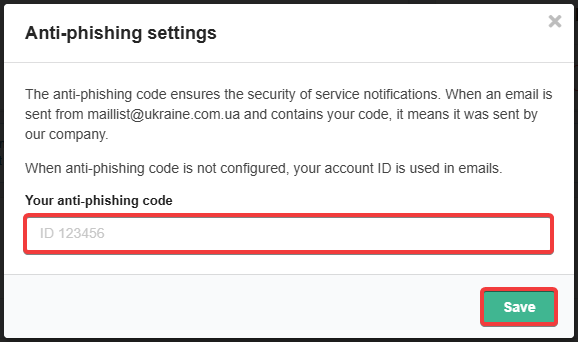
- Enter your anti-phishing code, which only you will know, and save the changes:
- When the anti-phishing code is configured, a corresponding message is displayed next to the settings button:

Emails
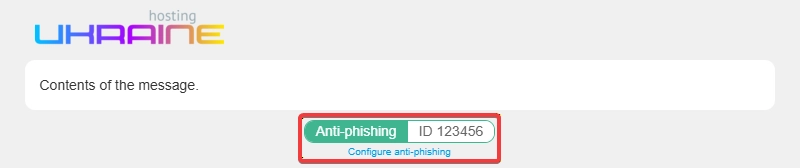
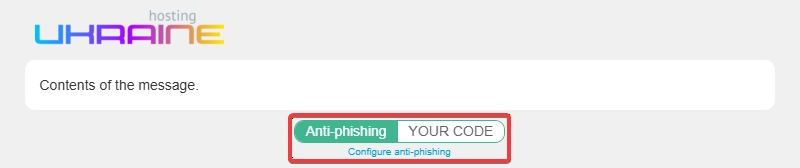
Examples of how anti-phishing code appears in emails:
- Anti-phishing code is not configured — account ID is used:
- Anti-phishing code is configured:
(45)
Comments
Після нових правил листи перестали відправлятися з форми. Натомість приходят листи, про спробу надіслати лист з форми Але у листа неправильний заголовок from. Куди і що прописати (ідентифікатор чи цей код безпеки) щоб форма запрацювала і ми почали отримувати запити від наших клієнтів?
Проблема з заголовком «From» пов’язана з налаштуванням надсилання пошти безпосередньо на вашому сайті. Більш детальну інформацію можна знайти у відповідній статті — https://www.ukraine.com.ua/wiki/mail/issues/invalid-from/
Для чого всі ці ускладнення? Просто згенеруйте код для всіх користувачів. Потім хто захоче - змінить на власний.
За замовчуванням так і є — в якості антифішингового коду використовується ID облікового запису, який за бажанням кожен може змінити на власний.
> Для чого всі ці ускладнення?
Щоб пам’ятати антифішинговий код, він має бути придуманий та вказаний самостійно. Якщо автоматично генерувати рандомні коди, то це не буде мати сенсу, бо користувачі не будут їх знати і не зможуть за кодом без входу в панель керування відрізнити фішинговий лист від справжнього.
Зверніть увагу, що налаштування антифішингового коду це не обов’язкова дія, а лише рекомендація. Якщо ви не хочете його налаштовувати, то можете просто закрити сповіщення в панелі керування та більше нічого не робити. Просто самостійно придуманий код зазвичай простіше пам’ятати, ніж ID свого облікового запису.