Manage cookies that are used for advertising, such as ad personalization, remarketing, and ad effectiveness analysis.
2.4.1.3.3. IP statistics
Important points:
- Statistics are available for the last 3 days, including today. You can only select days for which data is available.
- The statistics do not include requests from IP addresses from the Firewall whitelist, search engine requests, internal site requests, and some requests from trusted services (API requests from banks, mail services, etc.).
You can view statistics in the "IP statistics" section.
In the block above the statistics, you can select the date and countries for which you need statistics:
The statistics show information about the number of requests to the site that came from a specific IP address on the selected day: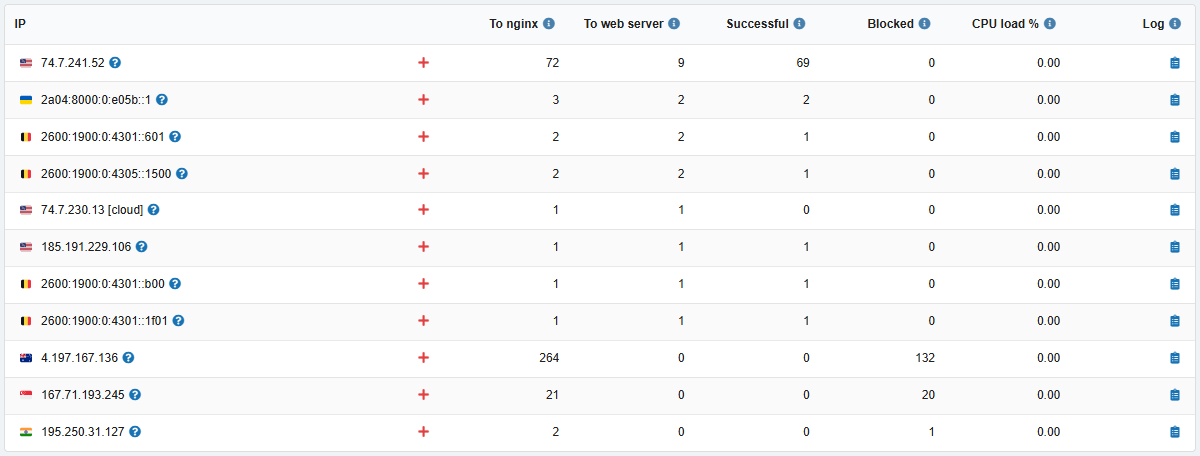
- IP — IP address from which the requests were made. Two additional buttons are available in the row with each address:
- ❔ Who is it? — view information about the owner of the IP address.
- ➕ Deny access — add/remove the IP address from the blacklist.
- To nginx — how many requests the nginx server processed.
- This is the total number of requests to the site, including those forwarded to the web server for processing (nginx processes requests for static content itself and forwards the rest to the web server).
- To web server — how many requests were processed by the used web server.
- Usually, these are POST requests and dynamic content. These types of requests most often create load.
- Successful — the number of requests with a 2xx response.
- Blocked — the number of requests with responses 403, 429, 5xx.
- Usually, these are requests for which the protection system or access restriction rules by IP/bots/countries (see Site protection) have been triggered.
- CPU load % — the percentage of load time on a 1 CPU core (see Exceeding CPU minutes consumption).
- 📋 Log — opens site access logs filtered by this IP address.
(1)
Comments