Manage cookies that are used for advertising, such as ad personalization, remarketing, and ad effectiveness analysis.
2.4.1.2.9. File protection (HotLink)
The HotLink system allows you to protect your site files from being used on third-party resources when direct links to files are embedded in the page code.
Configure
Configuring is performed in the "Site protection" section on the "File protection" tab: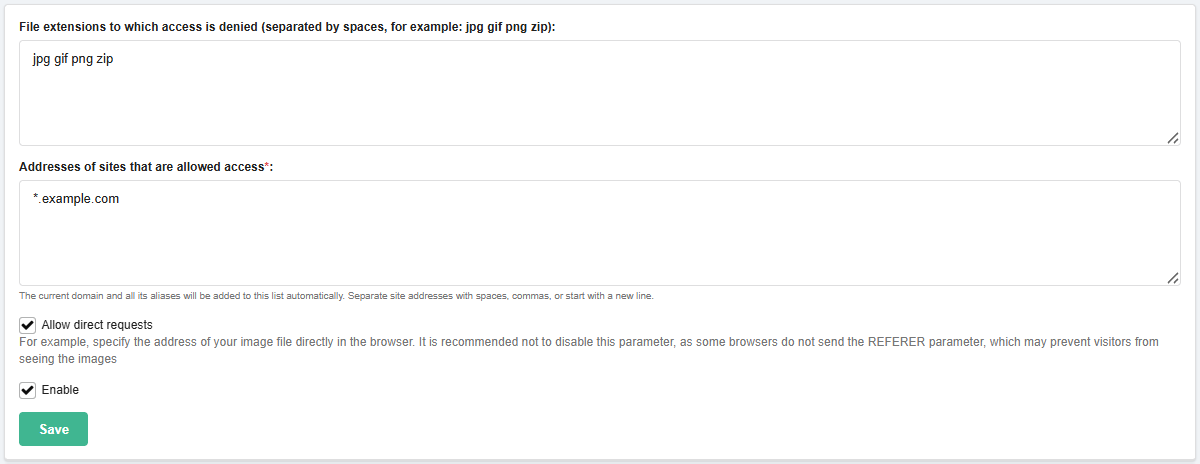
- File extensions to which access is denied — file extensions to which HotLink rules apply (separated by spaces).
- Addresses of sites that are allowed access — addresses that are allowed to use the site files and are not affected by HotLink protection (separated by a space or a new line). Addresses can be specified with a mask, for example:
example.com/files/images/— allows embedding only at a specific address of a specific domain.*.example.com— allows embedding for all subdomains of theexample.comdomain.example.*— allows embedding for domains with the nameexamplein any zone.
- Allow direct requests — access to files via direct requests without embedding on the site.
- For example, when the option is disabled, the image on the site
example.comwill be displayed, but direct requests toexample.com/image.jpgwill be denied.
- Enable — enable HotLink protection.