Manage cookies that are used for advertising, such as ad personalization, remarketing, and ad effectiveness analysis.
2.4.1.2.5. Country access restrictions
Important points:
- The default rule and individual country rules may not be the same:
- A country will not be added to the list if a rule is selected for it that is the same as the default rule.
- When you change the default rule, all countries with the same rule are deleted from the country list.
- Checking is not performed for IP addresses that are added to the Firewall whitelist.
Principle of operation
Restricting access by country allows you to set different levels of access to the site for visitors from different countries — allow access, allow access only after successfully passing a JavaScript or captcha check, or deny access.
flowchart LR
request@{ shape: stadium, label: "➡️ Request" }
whitelist@{ shape: rounded, label: "🧱 Restricted
access mode" } blacklist@{ shape: rounded, label: "📋 IP blacklist" } firewall@{ shape: rounded, label: "🔥 Firewall" } bots@{ shape: rounded, label: "🤖 Bot
protection" } subgraph countries [🌎 Countries] list@{ shape: diamond, label: "📋 Country
in list?" } default@{ shape: rounded, label: "🌐 Applies
rule
*by default*" } country@{ shape: rounded, label: "🌎 Applies
rule
*for country*" } subgraph rules [Rules] allow@{ shape: rounded, label: "✔️ Allow
access" } ddos@{ shape: rounded, label: "🤝 Disable
DDoS protection" } captcha@{ shape: rounded, label: "🔢 Check
JS/Captcha" } deny@{ shape: rounded, label: "🚫 Deny
access" } end end suspicious@{ shape: rounded, label: "🔍 Suspicious IPs" } iam@{ shape: rounded, label: "🛡️ I'm Under Attack" } site@{ shape: stadium, label: "✅ Site" } error_429@{ shape: stadium, label: "🚫 Error 429" } error_403@{ shape: stadium, label: "🚫 Error 403" } request-->blacklist request-->whitelist whitelist-->firewall blacklist-->firewall firewall-->bots bots-->list list-->|❌|default list-->|✅|country default-->rules country-->rules allow-->suspicious ddos-->site captcha-...->|❌|error_429 captcha-->|✅|site deny-...->error_403 suspicious-->iam iam-->site firewall-.->site bots-.->site
access mode" } blacklist@{ shape: rounded, label: "📋 IP blacklist" } firewall@{ shape: rounded, label: "🔥 Firewall" } bots@{ shape: rounded, label: "🤖 Bot
protection" } subgraph countries [🌎 Countries] list@{ shape: diamond, label: "📋 Country
in list?" } default@{ shape: rounded, label: "🌐 Applies
rule
*by default*" } country@{ shape: rounded, label: "🌎 Applies
rule
*for country*" } subgraph rules [Rules] allow@{ shape: rounded, label: "✔️ Allow
access" } ddos@{ shape: rounded, label: "🤝 Disable
DDoS protection" } captcha@{ shape: rounded, label: "🔢 Check
JS/Captcha" } deny@{ shape: rounded, label: "🚫 Deny
access" } end end suspicious@{ shape: rounded, label: "🔍 Suspicious IPs" } iam@{ shape: rounded, label: "🛡️ I'm Under Attack" } site@{ shape: stadium, label: "✅ Site" } error_429@{ shape: stadium, label: "🚫 Error 429" } error_403@{ shape: stadium, label: "🚫 Error 403" } request-->blacklist request-->whitelist whitelist-->firewall blacklist-->firewall firewall-->bots bots-->list list-->|❌|default list-->|✅|country default-->rules country-->rules allow-->suspicious ddos-->site captcha-...->|❌|error_429 captcha-->|✅|site deny-...->error_403 suspicious-->iam iam-->site firewall-.->site bots-.->site
In the chain of all site protection stages, access restriction by country comes after restricted access mode, IP blacklist, Firewall and bot protection before checking suspicious IPs and I'm Under Attack .
Configure
Access to the site for visitors from different countries is configured in the "Site protection" section on the "Countries" tab using the following rules:
- Allow access — normal mode considering the settings of I'm Under Attack, with active protection, the site will be accessible only after successful visitor verification, in case of failure, error 429 will be returned.
- Disable DDoS protection — similar to normal mode, but without considering the settings of I'm Under Attack, the site will be available regardless of whether protection is enabled or not.
- Auto-select JS/Captcha — check method is selected automatically: to access the site, JavaScript will be checked in the visitor’s browser and a progress bar will be displayed, or the visitor will need to pass a captcha; in case of failure there will be error 429.
- Check Captcha — to access site visitor will need to pass our captcha with numbers, in case of failure there will be error 429.
- Deny access — all visitors will get error 403.
At the top, a default rule is configured that will apply to requests from all countries for which no individual rules are configured (see below):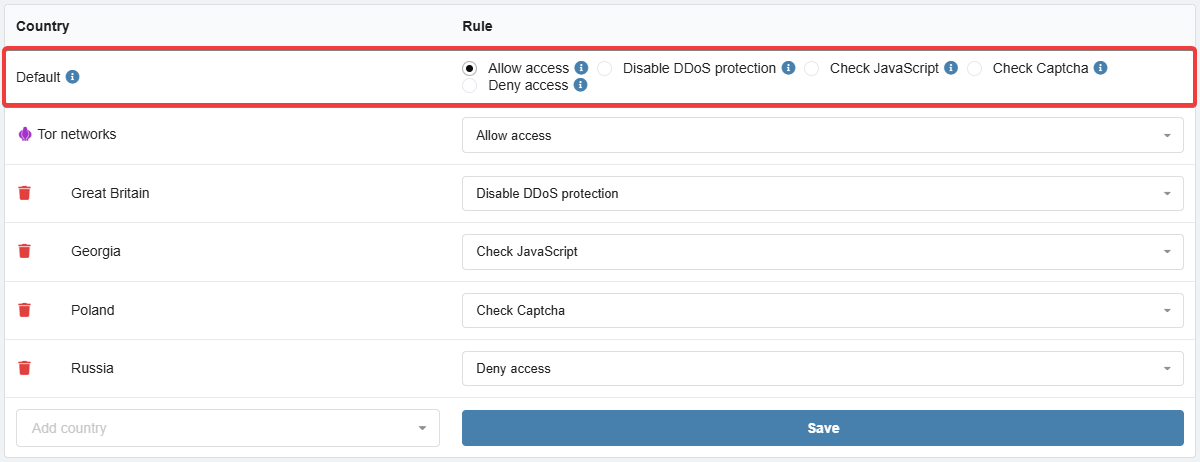
The "Tor networks" option allows you to configure access for requests from the Tor network.
At the bottom is a list of countries with individual rules that apply instead of the default rule: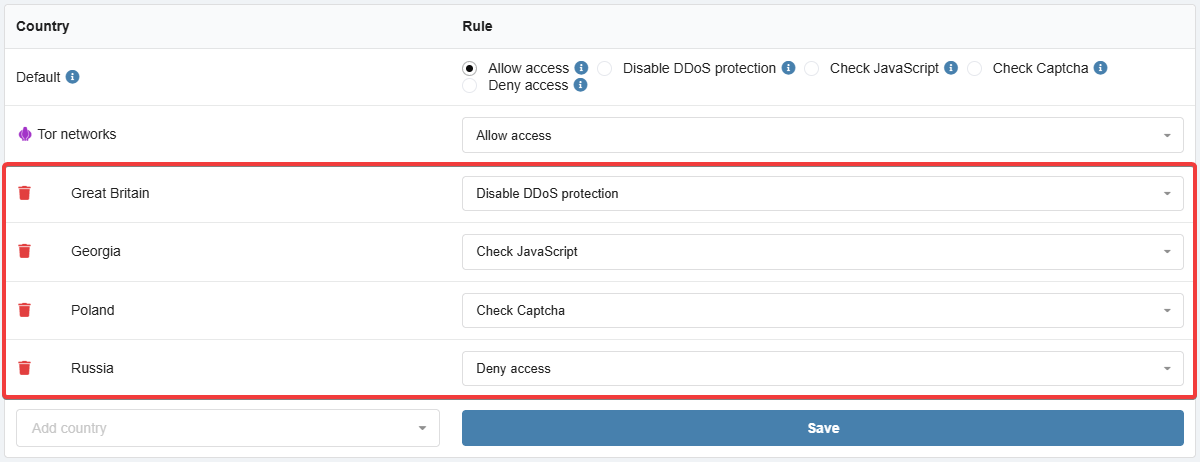
To add a country, select it in the "Add country" field — it will appear in the list of countries, select a rule for it and save the changes.
To delete a country from the list, click 🗑 to the left of its name.
Statistics
Statistics allow you to quickly determine which countries are generating the most requests and for which of them may require access restrictions.
At the top of the "Countries" tab, the top 20 countries are displayed based on the number of allowed requests (total requests minus blocked and filtered requests) by day for the last 10 days: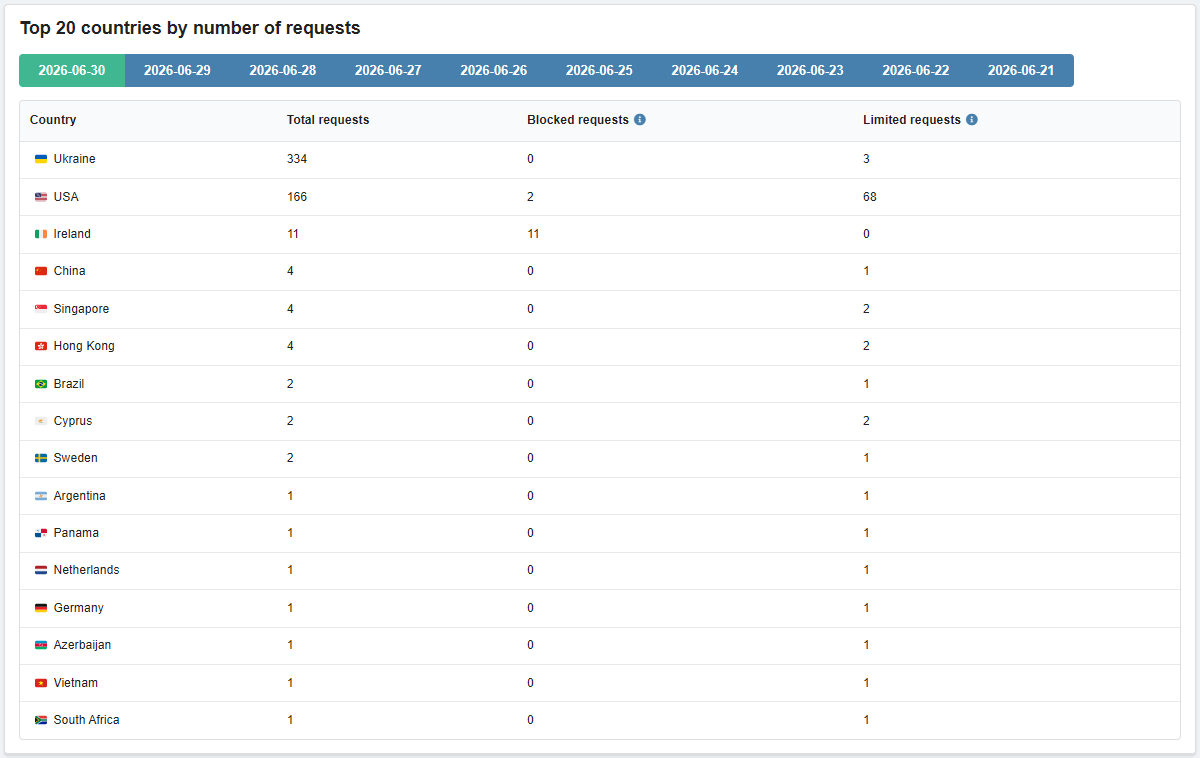
(6)