Manage cookies that are used for advertising, such as ad personalization, remarketing, and ad effectiveness analysis.
2.4.1.1.13. Server caching
Important points:
- When enabling caching, make sure the site returns no-cache headers when accessing its admin panel; otherwise, such pages may be cached and become accessible to unauthorized users, or configure exceptions.
- When using sessions, PHP automatically adds the
Cache-Controlheader to responses, and caching does not work by default. For caching to work, the cache limiter value must bepublic(see session_cache_limiter).
How caching works
sequenceDiagram
autonumber
participant client as Client
box Hosting
participant cache as Cache
participant site as Site
end
client->>cache: Request
cache->>cache: Cache check
alt Cache exists and is not ignored
cache->>client: Response from cache
else Cache is missing or being ignored
cache->>site: Request
end
site->>site: Request processing
alt Without storing in cache
site->>client: Response
else With storing in cache
site->>cache: Response
cache->>cache: Response caching
cache->>client: Response
end
When using caching, all server responses are stored in the cache, and when receiving new requests, instead of forwarding them to the site scripts for processing, a ready-made response is returned from the cache. Using caching helps to significantly reduce the load on the web server.
The page is not stored in the cache:
- If the request contains:
- The
Cookieheader with thenocachekey with a non-empty value and not equal to0. - GET parameter
nocachewith a non-empty value and not equal to0. - The
Authorizationheader with a non-empty value and not equal to0.
- If the response contains:
- The
X-Accel-Expiresheader with a value of0. - The
Set-Cookieheader. - The
Varyheader with the special value*. - The
Cache-Controlheader with any of the following values:max-age=0,private,no-store,no-cache.
- If in the "Hosting → My sites → your site → PHP settings" section, the "output_buffering" option is disabled (when buffering is disabled, nginx does not process data from the web server and cannot cache it).
The existing cache is ignored if the request contains the same headers/parameters that prevent the page from being cached (see above). ⚠️ The cache is not overwritten or deleted. For example, when request A was made, the page was stored in the cache, then request B was made with conditions for ignoring the cache — the cache was ignored and the page was returned by the site, if request C is made without conditions for ignoring the cache — the cache that was generated for request A will be returned.
Using the X-Cache-Status response header, you can monitor cache usage:
- Page was returned by the site:
MISS— page was not in the cache.BYPASS— cache was ignored (see above).EXPIRED— cache lifetime has expired.
- Page was returned from cache:
STALE— cache lifetime has expired, but the current version of the page could not be obtained from the site.REVALIDATED— cache lifetime has expired, but it was revalidated using theIf-Modified-SinceorIf-None-Matchheader.UPDATING— cache lifetime has expired, but the page is being updated from the site.HIT— page was returned from cache.
When the cache is ignored and the response contains the Cache-Control header, the status may be appended with an indication of the reason why the cache was ignored: /PRIVATE, /NO-CACHE, /NO-STORE, /MAX-AGE.
Caching settings
To configure caching in the "Hosting → My sites → your site → Site settings" on the "Caching" tab in the "Site caching settings" section, select the desired mode, specify the cache lifetime, and save your changes: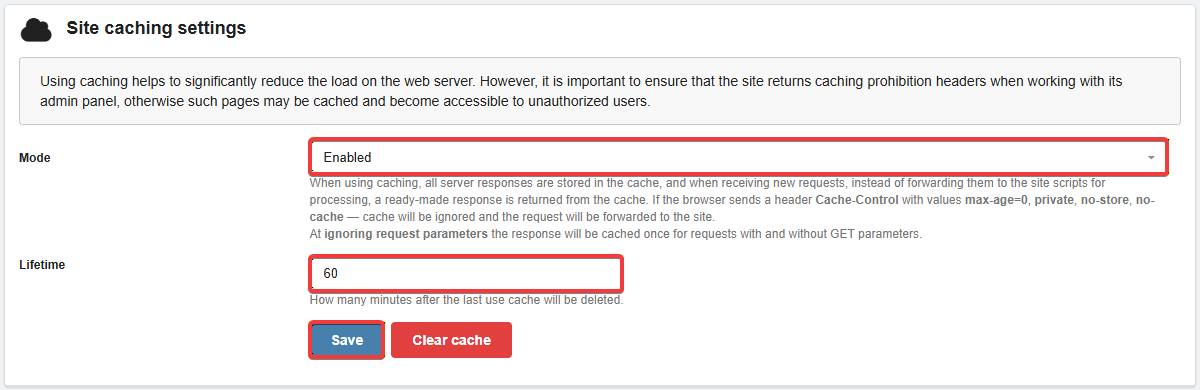
- Mode:
- Disabled — caching is disabled.
- Enabled — caching with GET parameters (for requests to the same page with different GET parameters and without them, different responses will be returned from the cache).
- Ignore request parameters — caching with GET parameters ignored (for requests to the same page with different GET parameters or without them, the same response will be returned from the cache).
- Lifetime — how many minutes after the last use cache will be deleted.
- Selected individually. For sites with frequent content updates, you can use lower values; for sites with infrequent updates, you can use higher values.
Configure exceptions
You only need to configure exceptions separately for those parts of the site for which the site's scripts do not return cache-ignore headers (see above).
If you want to prevent certain pages or sections of the site from being cached, regardless of whether they have the necessary headers, add rules to exclude them in the "Exceptions from caching" section: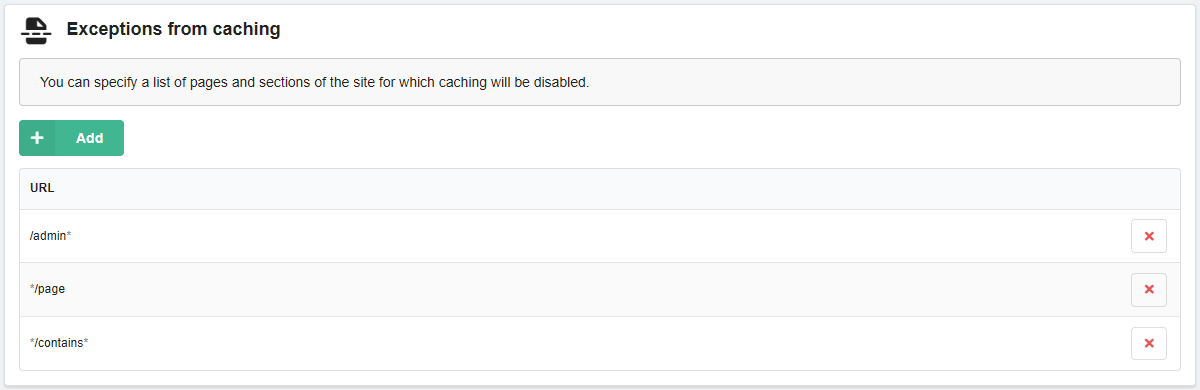
After clicking the "Add" button, enter the following information in the add form:
- Applying — which part of the URL will be searched:
- URL starts with — at beginning of URL.
- URL ends with — at end of URL.
- URL contains — in any part of URL.
- URL — a string that will be searched for in the selected part of URL:
- Domain does not need to be specified.
- The slash
/at the beginning and end is not required.
Here are a few examples:
- If you select URL starts with and specify the URL as
admin, an exception will be added as/admin*, and caching will not be applied to any URLs that start with/admin. - If you select URL ends with and specify the URL as
page, an exception will be added as*/page, and caching will not be applied to any URLs that end with/page. - If you select URL contains and specify the URL as
contains, the exception will be added as*/contains*, and caching will not be applied to any URLs that contain/containsin the middle.
Clear cache
In the "Site caching settings" section, click "Clear cache".
(6)
Comments
Так ви точно дізнаєтесь, що саме займає найбільше місця.
В WP Engine давно вже є. Ви маєте бути такими ж крутими.
Дякую