Manage cookies that are used for advertising, such as ad personalization, remarketing, and ad effectiveness analysis.
10.12. Get contract
Important points:
- The text of the contract is available on the Public Offer page. The contract is identical for all users; no changes may be made to it, and no supplementary agreements may be signed regarding it.
- You do not need to sign a contract to order any of our services — simply register on our site and accept the terms of our public offer.
- Only FOPs and Ukrainian legal entities are able to sign a contract.
- The contract is valid for 1 year. Upon expiration, simply sign a new contract with the same end date as the previous one.
- In accounting, transactions are recorded in the period in which they are carried out, not when they are documented. Therefore, the date of a business transaction is the date of the document, not the date it was signed.
flowchart LR
individual@{ shape: stadium, label: "👤 Individual" }
fop@{ shape: stadium, label: "🧑💼 FOP" }
company_ukraine@{ shape: stadium, label: "🏢 Ukrainian legal entity" }
company_foreign@{ shape: stadium, label: "🏢 Foreign legal entity" }
create@{ shape: rect, label: "📝 Forming contract" }
our_sign@{ shape: rect, label: "🔏 Our signature" }
subgraph sign [🔏 Your signature]
vchasno@{ shape: rounded, label: "🌐 Vchasno" }
paperless@{ shape: rounded, label: "🌐 Paperless" }
medoc@{ shape: rounded, label: "🌐 M.E.Doc" }
end
wait_our_sign@{ shape: rect, label: "⏳ Waiting for our signature" }
done@{ shape: stadium, label: "✔️ Done" }
individual-.-xcreate
fop-->create
company_ukraine-->create
company_foreign-.-xcreate
create-->vchasno
create-->paperless
create-->our_sign
our_sign-->medoc
vchasno-->wait_our_sign
paperless-->wait_our_sign
wait_our_sign-->done
medoc-->done
Individuals
Individuals cannot get the contract. They can only view its text on the site (see link at the beginning of the article).
FOPs and Ukrainian legal entities
- Open the "Personal data" section.
- On the "Personal info" tab:
- Make sure your information is filled out. If most of the fields are empty, pay for the services using your settlement account (the fields will be automatically filled in with data from the state registry after the first payment is received).
- For Ukrainian legal entities — please also provide the the title of the executive, the title of the executive in the genitive case, and the legal basis for the executive's authority.
- On the "Basic info" tab, in the "Contract" section, fill in the fields and click "Download contract":
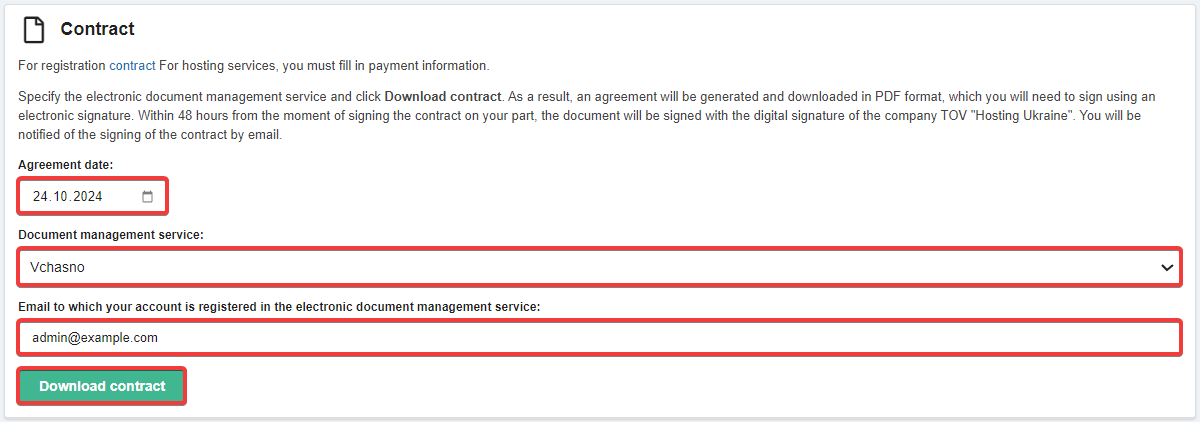
- Contract date — the date the contract was concluded (within the range from the registration date to the current date).
- Regardless of the date selected, the contract is formed only in the version currently in effect.
- Email to which your account is registered in the electronic document management service — the email address to which your account is registered in the selected electronic document management service.
- Sign the contract using EDS in the selected electronic document management service (you must use the EDS of the person or organization whose account is registered on our site).
- Wait for the contract to be signed by Hosting Ukraine LLC within 48 hours (except for M.E.Doc — in this case, the contract will be signed by us immediately).
Foreign legal entities
Foreign legal entities do not need to form and sign a contract using EDS. It is sufficient to accept the terms of the public offer and simply pay for the services.
(7)