Manage cookies that are used for advertising, such as ad personalization, remarketing, and ad effectiveness analysis.
10.1.3. Get invoice in PDF format
Before payment
Language and currency of invoices
For FOP and Ukrainian legal entities the accounts are provided in Ukrainian in hryvnia (₴), for foreign legal entities — in English in euro (€).Individuals
Important points:
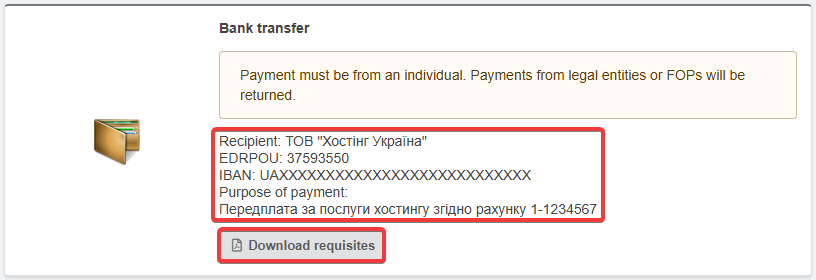
- Only payment requisites are available. Download of invoices is not available.
- When paying, be sure to specify the purpose of payment. Without this, the payment will not be credited automatically.
- Do not pay for services from the settlement accounts of FOP or legal entities. Such payments will not be credited.
- Create invoice for renewal of the desired service(s).
- Proceed to payment.
- On the payment method selection page in the "Bank transfer" block, copy the payment requisites or download a PDF file with them:
FOP
- Create invoice for renewal of the desired service(s).
- Proceed to payment.
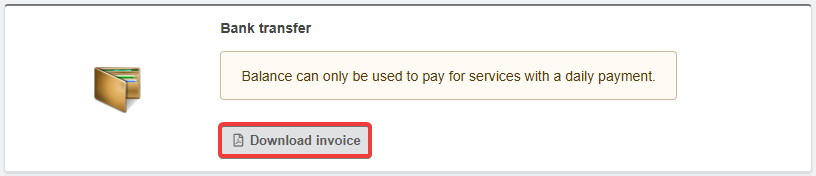
- On the payment method selection page in the "Bank transfer" block click "Download invoice":
Ukrainian legal entities
- Create invoice for renewal of the desired service(s).
- Open the "Invoices" section.
- In the row with the desired invoice, click one of the buttons in the "Payment" column:

- Red button (sheet of paper with PDF logo) — download invoice in PDF format.
- Blue button (envelope) — send invoice in PDF format to email (after pressing it you will need to specify the recipient's address).
Foreign legal entities
Attention!
The ability to get an invoice is only available to accounts registered to foreign companies.
After payment
Paid invoices can be downloaded in the "Invoices" section. The language and currency of the invoice depend on the payment method.